
Most organizations that have invested in Microsoft Dynamics 365 already have more automation potential than they are using. Power Automate flows handle scheduled tasks. Dynamics 365 modules manage transactions. But between those two layers sits a growing category of work — high-volume, judgment-dependent, repetitive — that neither a scheduled flow nor a human operator handles well at scale. That is the gap AI agents are designed to close.
What makes an AI agent different from an automation workflow?
Most organizations already run Power Automate flows — scheduled or event-driven sequences that follow a fixed set of rules. An agent is something different. Where a flow follows a predefined path, an agent decides which path to take based on context, instructions, and the data available to it at runtime.
Microsoft Copilot Studio distinguishes between two fundamental approaches. The first uses classic orchestration through Topics — structured conversation flows where each step, condition, and action is explicitly defined, making the agent predictable and easy to audit. The second is generative orchestration, where the agent uses generative AI to determine which topics, knowledge sources, or actions to invoke based on the user’s intent or an incoming trigger — without a human scripting every branch. Autonomous agents perceive events, make decisions, and execute tasks independently using triggers, instructions, and guardrails you define — operating continuously in the background, monitoring data, reacting to conditions, and running workflows at scale.
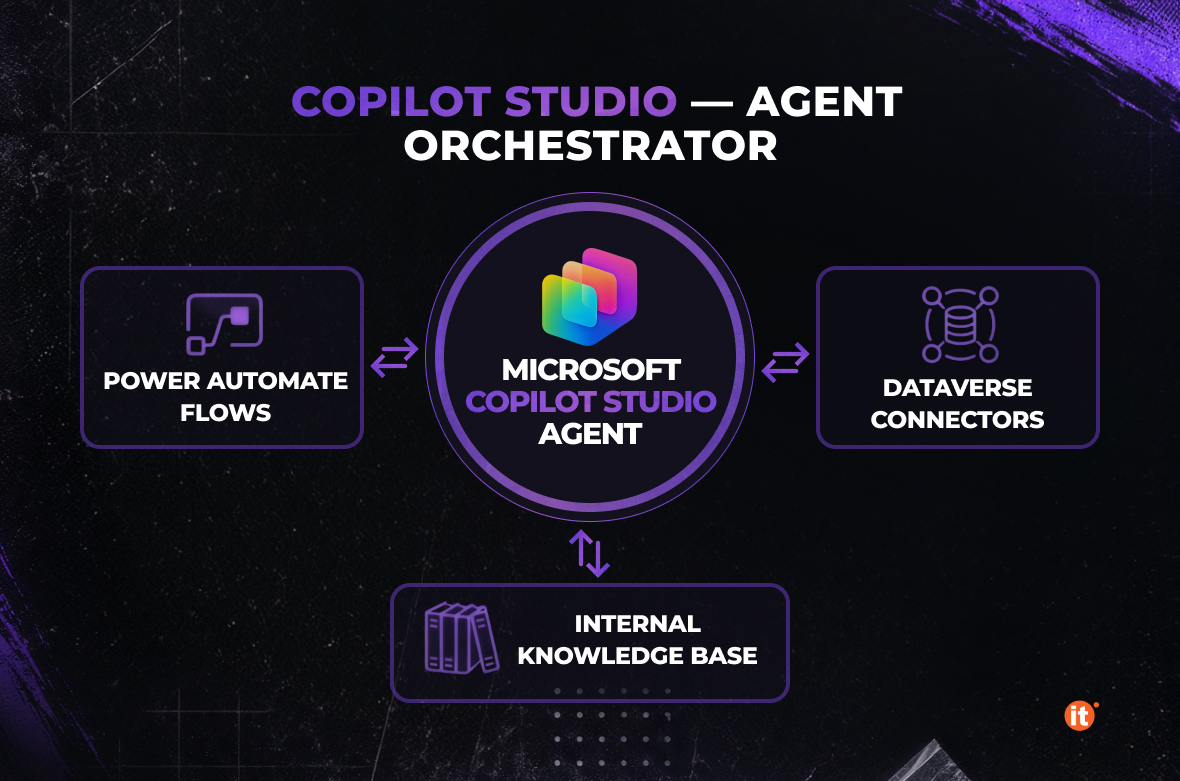
Power Automate flows remain a separate but complementary layer. They integrate into Copilot Studio as Actions — tools the agent can call to read or write data, update an ERP record, or trigger a downstream process. Those flows continue to live in Power Automate, managed through the standard portal or solution packages. Copilot Studio orchestrates when to call them; it does not replace your existing automation estate.
Where to start — four process categories that deliver results fastest
Four categories meet that description reliably.
Finance operations — period-close reconciliation, subledger matching, and bank statement clearing — involve exactly the kind of pattern-based judgment an agent can apply at scale.
Supply chain and procurement — supplier email follow-ups, purchase order confirmation chasing, delivery exception handling — happen continuously, and every missed confirmation is a potential disruption.
HR and time management — time and expense entry, leave approvals, payroll-adjacent workflows — carry disproportionate compliance risk given how routine the underlying decisions are.
Internal knowledge and IT support — policy Q&A, onboarding tasks, helpdesk triage — consume skilled staff time on interactions a well-grounded conversational agent handles without escalation.
The selection principle: pick a process where the cost of a wrong decision is recoverable, the volume justifies the build, and the current manual effort is measurable. That last point matters — you will need a baseline to demonstrate return.
What’s already built into Dynamics 365 — and what you need to build yourself
Organizations running Dynamics 365 Finance & Operations do not need to start from scratch. Several purpose-built agents are immediately relevant for internal operations.
In Dynamics 365 Supply Chain Management, the Procurement Agent automates routine vendor communications — reading inbound emails from vendors, determining what each message is about, such as a purchase order confirmation or change request, and matching the extracted information to fields in the system. Microsoft’s documentation also still labels the underlying Copilot Studio components as the Supplier Communications Agent, so both names appear depending on which part of the documentation you read — the capability is the same.
The Account Reconciliation Agent in Dynamics 365 Finance automates the matching and clearing of transactions between subledgers and the general ledger, helping accountants and controllers speed up the financial close process. Rather than waiting until period end, it continuously monitors balances and delivers immediate notifications when discrepancies occur, along with actionable recommendations.
In Dynamics 365 Project Operations, time and expense automation is now split across three agents working together: the Time Entry Agent creates weekly time entries based on project assignments and bookings, and sends reminders for missing hours; the Expense Agent processes receipts and emails into draft expense lines and reports; and the Approvals Agent streamlines the approval process for time, expense, and material transactions by classifying records and, optionally, auto-approving them against an uploaded policy document.
Custom agents become relevant when your process does not match a built-in template, or when you need to combine Dynamics 365 data with an external system, a Teams-based approval, or a Dataverse record outside the standard modules. Microsoft Copilot Studio is the build layer for those scenarios. Power Automate flows integrate as Actions — callable tools the agent invokes at the right moment — while remaining managed and versioned in the Power Automate portal.
A four-step implementation framework
Step 1: Map the process and define the trigger. Document what the agent needs to do before opening Copilot Studio: what event starts the process, what data it needs, what decisions it makes, and what it does with the output. A vaguely scoped agent is harder to test, harder to govern, and harder to measure.
Step 2: Connect to data. Copilot Studio connects to data sources using prebuilt or custom connectors, enabling sophisticated logic across the Microsoft ecosystem. For Dynamics 365 environments, this means linking the agent to Finance or Supply Chain entities through virtual entities or Power Platform connectors. Agents can reference Outlook emails and Teams messages, but this requires deliberate security design. Reading personal group chats or a user’s Teams correspondence requires the agent to operate under user delegation rather than application-level permissions — a distinction your Power Platform administrator needs to resolve before that data source enters an agent’s knowledge scope. Teams channel content is the safer starting point.
Step 3: Configure instructions, actions, and escalation paths. Instructions define the agent’s behavior in natural language. Microsoft recommends defining clear scope and goals, applying least-privileged access, and treating the agent as an evolving project with incremental expansions of responsibility rather than broad autonomy from day one. Every production agent needs a defined handoff for exceptions it cannot resolve — the Approvals Agent in Project Operations illustrates this pattern directly, since it can be configured to either flag records for manual sign-off or auto-approve them once a policy document defines the rules.
Step 4: Publish, monitor, and measure. Teams can configure savings settings for each agent — defining how much time or cost is saved per interaction or workflow — and Copilot Studio aggregates these metrics automatically, giving a running view of the business value agents deliver.
Governance, security, and the human-in-the-loop question
The most common concern from IT directors and compliance teams is not whether agents work — it is whether they can be controlled. Copilot Studio agents use generative orchestration to decide which topics, knowledge sources, or actions to invoke at runtime — and Microsoft designs this autonomy to remain controlled: every agent operates within scoped permissions, explicit decision boundaries, and auditable processes. Power Platform Data Loss Prevention policies govern which connectors an agent can use; Microsoft Entra provides identity management, and role-based access control, inherited from Dynamics 365, determines what data the agent can read or write.
Build escalation into the agent’s instructions from the start, not as an afterthought. An Account Reconciliation Agent that auto-clears matches below a defined confidence threshold and flags everything above it for controller review is not a less capable agent — it is a production-ready one. Agent flows can include human review steps, providing teams with a structured approval gate within the automated process. Every agent action in Copilot Studio is logged and accessible from the Activity tab — satisfying the basic requirements of most internal audit frameworks without custom development.
Conclusion
AI agents for internal processes are not a future capability on the Microsoft platform — they are a current one, already embedded in Dynamics 365 and extensible through Microsoft Copilot Studio for every process that does not fit a standard template. The Forrester Total Economic Impact study commissioned by Microsoft on Power Platform reports a three-year ROI in the range of 216–224% across Microsoft’s own published materials (Forrester TEI of Microsoft Power Platform, 2024) — before accounting for the additional leverage autonomous agents add on top of the base platform.