

A heat pump commissioned in Aarhus this autumn will need inspections, parts, and fault calls for a decade or more. The firm that holds the record of that unit — what it is, where it stands, what was done to it — is best placed to keep the service contract. Microsoft Dynamics 365 Field Service can hold that record and schedule the work from it, provided a few design decisions are settled before go-live.
Revenue sits in the installed base
A Nordic installer that fits heat pumps, lifts, or inverters signs up for years of follow-on work with every unit: inspections, component changes, fault calls. That work is predictable only if the firm knows what it installed, at which customer, where on the site, and what has been done to it since. In many service companies that knowledge sits in spreadsheets, in sales history, and in the heads of senior technicians. When a technician leaves, part of the installed base leaves with them.
Dynamics 365 Field Service keeps that register in the same system that dispatches the work. Field Service asset management rests on three layers — the asset record, the maintenance agreement, and optional sensor data — and each one depends on the layer beneath it.
Model the asset before the first work order
Field Service supports customer asset hierarchies through a Parent Asset field and a Sub Assets grid, so a heat pump can hold its compressor and the compressor its replaceable parts. Asset categories group similar equipment and apply property templates to the whole group, which keeps data consistent across thousands of units.
Functional locations add the where: a hierarchy of site, building, floor, or plant room, with assets placed inside it. On the work order, the functional location points the technician to the exact unit instead of only the customer’s street address.
Two design rules matter at go-live. First, the asset and the work order should share a service account — by default, a work order can only use assets that belong to its service account. Second, decide how new assets enter the register. When a product is marked Convert to Customer Asset and a technician records it as used, Field Service creates the customer asset once the work order is completed. Installation jobs then build the register as they close.
Let agreements generate the maintenance
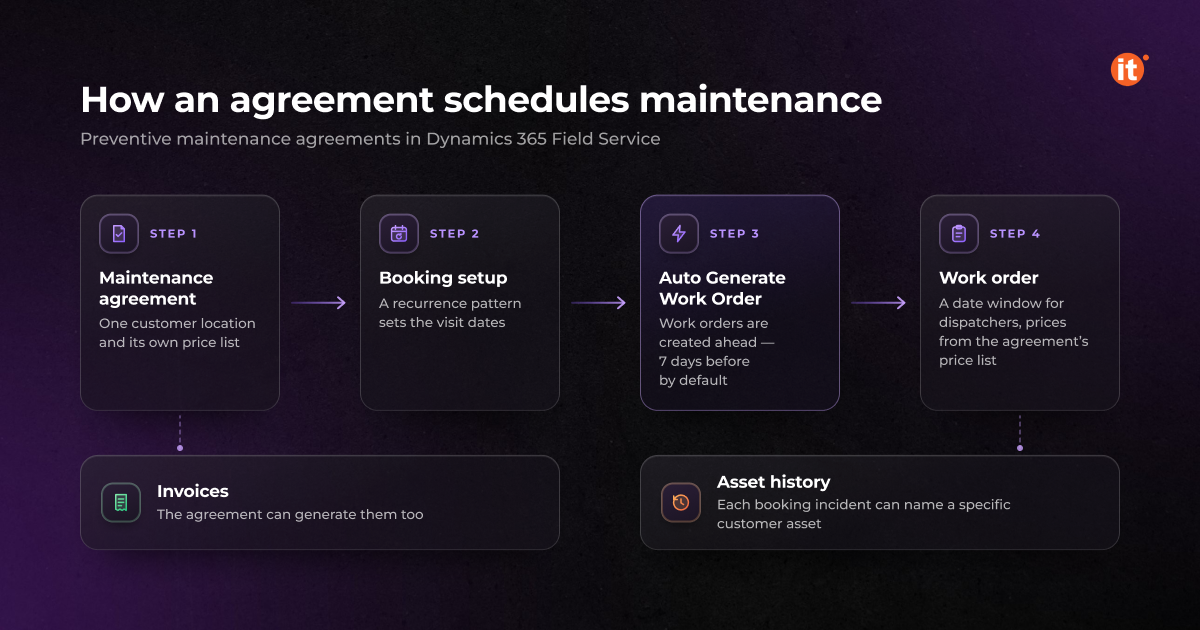
Recurring inspections run through preventive maintenance agreements. In agreement booking setups, a recurrence pattern produces booking dates, and each booking incident can name a specific customer asset. The work then lands in that asset’s service history rather than in a generic visit log.
With Auto Generate Work Order switched on, Field Service creates work orders on a rolling basis, a set number of days before the service date — seven by default if no value is configured. Pre- and post-booking flexibility become the date window on each work order, which gives dispatchers room to group visits by area. The agreement’s price list sets prices on every generated work order, and the same agreement can also generate invoices.
Preventive maintenance agreements need two structural decisions. An agreement runs at one service-account location, so a customer with several sites needs several agreements. And the firm chooses between one asset per work order, which keeps time reporting clean per unit, or several asset incidents on one visit.
Readings and history on the asset
Property logs record a value against a customer asset — refrigerant pressure or running hours, for example — at a specific reading time. Each new reading adds to the history instead of overwriting the last one, so a trend is visible before the unit fails.
Service history builds from work order incidents and agreement incidents. When an asset sits on an incident, it carries through to the products, services, and service tasks that follow, and managers can see every work order raised against that unit. When a long service contract comes up for renewal, that record shows the customer what the firm has actually done.
When sensors raise the work order
For connected equipment, Connected Field Service with Azure IoT Hub adds a monitoring layer. Azure Stream Analytics checks incoming device data against threshold rules, Service Bus queues each fault, and an IoT alert is created in Dynamics 365 Field Service. One customer asset can carry many devices, and alerts from a sensor tag the related asset. A work order raised from the alert contains both the alert and the asset, and the technician sees the alert on their mobile device.
The path from alert to work order runs through a business process flow: alert, then case, then work order. That gives a service desk in Dynamics 365 Customer Service the chance to resolve a fault remotely before a technician drives out. It also fixes the order of a Field Service asset management rollout: sensors attach to customer assets, so the asset register has to exist first.
In-house assets vs customer assets
Sensor Data Intelligence is a Dynamics 365 Supply Chain Management feature, and in-house equipment is maintained in Supply Chain Management’s Asset Management module. Field Service customer assets cover equipment installed at customer sites. A service firm with its own vans, tools, and test rigs may need both registers. Decide which items belong where before data migration, or the same unit ends up in two systems with two histories.
OntargIT has delivered Dynamics 365 Field Service with Customer Service for KTS Engineering, a distributed-generation engineering company, automating field visit planning and case handling, and Field Service with Power Platform for nventive’s One Flow property-management solution. Its Nordic clients include Scatec Solar, a Norwegian renewable energy company (Dynamics 365 Finance and Supply Chain Management), and Tresor Invest, a Danish investment company (Dynamics 365 Sales and Business Central). A Microsoft partner since 2009 and a Microsoft Solutions Partner – AI Business Solutions, OntargIT has delivered 150+ projects for 140+ clients in 24 countries.
Field Service asset management pays off in a fixed order: the asset register first, then preventive maintenance agreements that schedule work against it, then sensors where a unit justifies them. Firms that connect sensors before the register is clean get alerts with no asset or history behind them. Book a free consultation — get a tailored Dynamics 365 roadmap in 30 minutes.