

A wind or solar portfolio of ten plants can mean ten loan agreements, ten revenue contracts and ten sets of statutory accounts. If the ERP is configured as though the group were one company, the finance team rebuilds plant results in spreadsheets every month. The fix sits in the first weeks of implementation. This guide shows how to set up a renewable energy ERP on Microsoft Dynamics 365 Finance so each plant reports on its own from day one — when a plant becomes a legal entity, when a financial dimension is enough, how intercompany flows and consolidation work, and how the plant’s physical assets map into operations.
Why plant-level structure is a finance question
Wind and solar portfolios are rarely financed on a single balance sheet. In IRENA’s survey of renewable power financing, project finance accounted for 88% of the financing structures reported, and balance sheet deals were the exception (IRENA, The cost of financing for renewable power, 2023). Interviewees described investment decisions built around the debt each project’s risk profile can support. That puts the individual plant at the centre of financial reporting.
Revenue adds a second layer. The same survey found power purchase agreements to be the most common way to secure revenue (43% of respondents), ahead of feed-in tariffs (22%) and contracts for difference (14%), while slightly more than half (51%) reported some merchant exposure. One portfolio can hold all four arrangements at once. A renewable energy ERP therefore has to show each plant’s contract, cost base and debt service on its own, then roll them up for the group without manual reconciliation.
Decide the entity model before go-live
In Dynamics 365 Finance, the organizational structure is the first design decision and the hardest to reverse. Microsoft’s implementation guidance describes it as the data structure for every downstream business process and the framework for application security. It recommends defining it as early as possible, because a fundamental change later in the project can cause significant rework.
The constraint is specific. Once a legal entity is saved, its ID becomes the company ID and can’t be edited — correcting a mistake means creating a new legal entity, repeating its configuration and migrating the data again. For a producer adding plants year after year, the legal entity structure agreed in early workshops will carry every new build and acquisition for the life of the system. Finance, operations and IT stakeholders — CFO, controller, COO — should sign it off before configuration starts.
Entity or dimension: where each plant lives
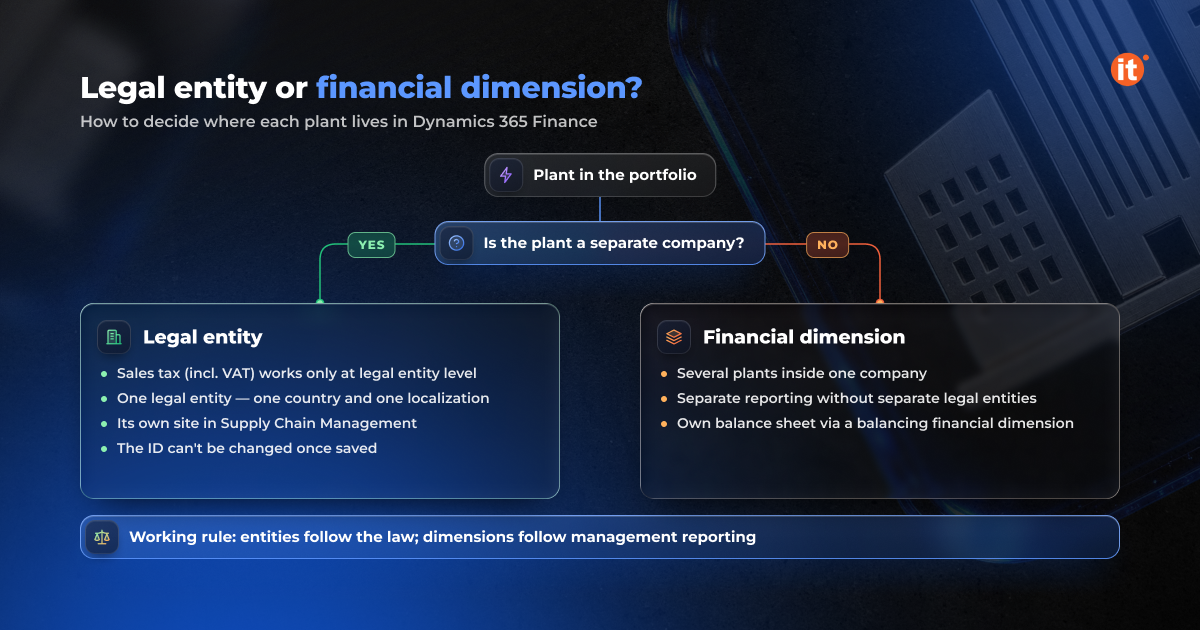
The first question for each plant is a legal one. If the plant is a separate company, it becomes its own legal entity in Dynamics 365 Finance. Microsoft’s documentation is explicit that sales tax functionality works only with legal entities, not with financial dimensions. Each legal entity is also tied to one localization, and Microsoft advises against combining countries in a single entity — so a portfolio in three countries needs at least three entities.
If several plants sit inside one company, a financial dimension is usually the right tool. Microsoft recommends against separate legal entities for units that aren’t legally separate. Where a plant still needs its own balance sheet, the ledger can use a balancing financial dimension: every entry carries an equal and opposite entry for the same dimension value, so each plant balances on its own. The working rule for the legal entity structure is simple. Entities follow the law; dimensions follow management reporting.
Intercompany flows and consolidation
Once plants sit in separate entities, money moves between them. A holding company may pay suppliers, recharge services or allocate shared costs. Intercompany accounting in Dynamics 365 Finance creates the matching Due to and Due from entries in both companies for daily journals, vendor invoice journals, ledger allocations and centralized payments. Microsoft recommends a unique intercompany main account per company to simplify reconciliation and elimination.
Centralized payments let one legal entity pay vendors and receive customer payments on behalf of the others, through an organization hierarchy set up for that purpose. At group level, consolidation runs in a separate legal entity that holds only consolidation transactions; it supports eliminations and multiple reporting currencies, and it can be rerun as often as needed.
Mapping plants in Supply Chain Management
The entity decision also shapes operations. In Microsoft Dynamics 365 Supply Chain Management, a site groups resources such as warehouses at one location, belongs to a single legal entity and can’t be shared between entities. A plant modelled as its own company therefore gets its own site.
Inside each plant, Asset Management functional locations build the technical hierarchy. They’re created hierarchically, can represent geographical sites, and trace assets to maintenance requests, work orders, fault registrations and production stops. A wind park can run from park to turbine; a solar plant from site to inverter. Construction connects here as well: build costs collected on a project can be estimated and eliminated to a fixed asset in the plant’s own entity. A renewable energy ERP designed this way keeps the legal, financial and physical views of each plant on one structure.
Conclusion
For a renewable producer, the most consequential ERP decision is made before any transaction posts: which plants become legal entities and which become dimensions. That choice fixes how tax is calculated, how intercompany balances eliminate, and whether each plant can report on its own. Map your portfolio — companies, countries, financing per plant — against that rule before configuration begins.