
A supplier emails to push a delivery back a week. The message sits in a shared purchasing inbox while the production schedule still plans around the old date, and nobody connects the two until the line runs short of material. The Procurement Agent in Dynamics 365 Supply Chain Management is built for that gap. This article sets out which procurement tasks manufacturing AI agents can own today, which still belong to a buyer, and which configuration decisions US manufacturers should settle before go-live.
What the Procurement Agent handles on its own
The Procurement Agent is Microsoft's first-party agent for Dynamics 365 Supply Chain Management, currently a production-ready preview with two capabilities — supplier communications and impact analysis — that a plant can switch on together or one at a time.
Chasing suppliers is the job it does most independently. When a purchase order stays unconfirmed or a delivery runs late, the agent writes the reminder itself and either sends it right away or saves it as a draft for a buyer to approve. For a purchasing team with a long list of open lines, that removes the daily hunt for orders that need a nudge.
Inbound email is the second job. The agent reads vendor messages, tells confirmations apart from change requests, matches them to purchase order numbers, and extracts the changed fields, including from PDF attachments. Buyers review the proposed update instead of opening each order by hand. This is the first place manufacturing AI agents earn their keep in procurement: structured purchase order changes instead of an inbox nobody fully owns.
Tracing a late PO to the production schedule
A three-day slip on a resin delivery can be harmless or can stop a line — it depends on what that material feeds. Impact analysis answers that question. It follows the changed supply through markings and peggings to linked sales, production, and transfer orders, then checks the result against confirmed incoming supply and projected on-hand inventory.
Each change comes back labeled either Has impact or No impact. Buyers can accept the No impact changes quickly and spend the morning on the handful that threaten a production order or a customer ship date. The analysis covers changes that arrive by email through supplier communications and changes that suppliers submit through the vendor collaboration interface.
There is a plant-side condition. Microsoft describes the tracing as using markings and peggings where they are available. If pegging and marking are not maintained consistently in Dynamics 365 Supply Chain Management, the agent has less of the chain to trace, and a No impact label carries less weight.
Where a buyer still decides
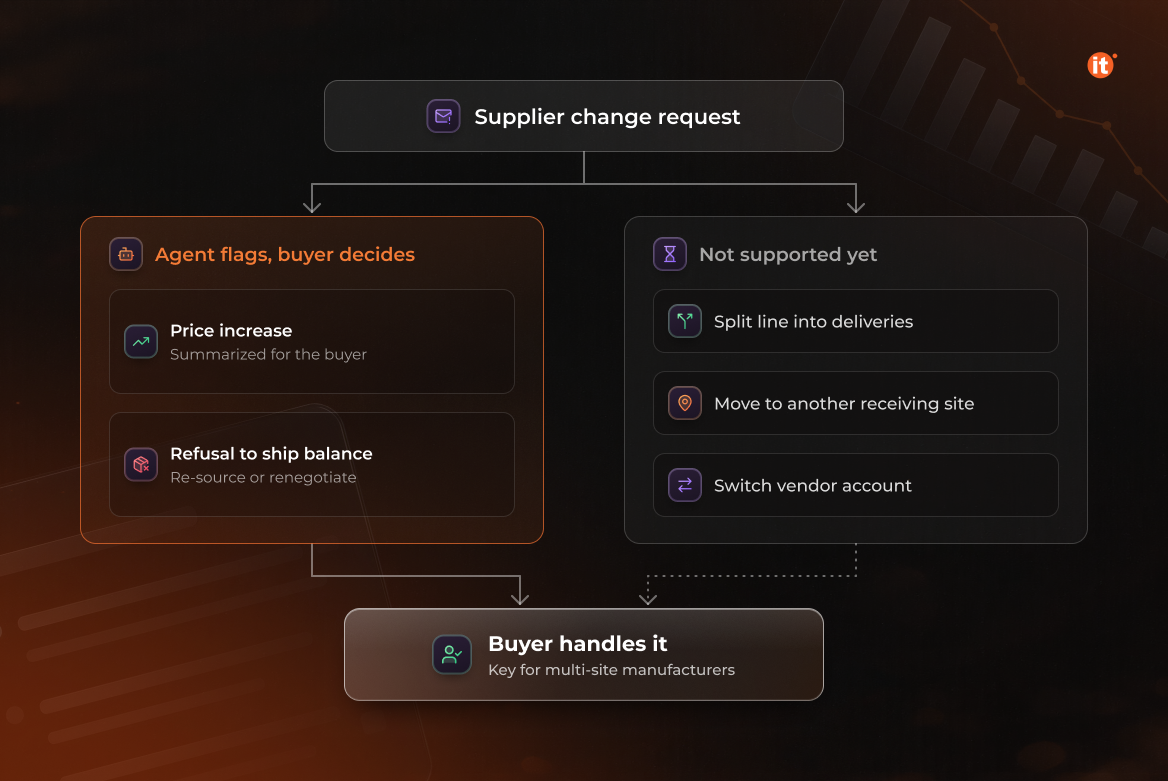
The agent recognizes commercial changes but does not settle them. The agent summarizes and flags a requested price increase for the buyer's decision, and flags a supplier's refusal to ship the remaining balance as an exception that typically calls for alternate sourcing or renegotiation.
Some purchase order changes are outside its reach for now. Microsoft's supplier communications documentation lists splitting a line into several deliveries, moving a line to a different receiving site, and switching to a different vendor account as scenarios the agent does not yet support. Manufacturers that receive at several sites should plan for buyers to keep handling these requests.
Setting the autonomy line before go-live
How much the agent does alone is a configuration decision made during implementation, not a fixed property of the product. Three settings define it: which vendors and mailboxes the agent reads, whether follow-ups send automatically or wait as drafts, and which change sources trigger impact analysis.
Cost follows the same decisions. The Procurement Agent is billed in Microsoft Copilot Studio credits: a fixed charge for each run plus a variable charge tied to what it processes, such as emails written or read, attachments, and line changes analyzed. In Microsoft's own example, if supplier communications reads every vendor's email in a shared mailbox and impact analysis runs on those emails, credits are consumed whenever any vendor writes about purchase order changes. A practical starting point is a pilot on a few high-volume suppliers with follow-ups held as drafts, widened once buyers trust the output.
Beyond procurement: custom agents for the rest of the plant
Microsoft's prebuilt agent for Supply Chain Management covers procurement; for other workflows, Microsoft points manufacturers to custom agents built in Copilot Studio. Most manufacturing AI agents for quality checks, maintenance, or production reporting will be built this way. They connect to the ERP through the Dynamics 365 ERP MCP server, which gives agents access to data operations and finance and operations business logic. An agent reaches only what its security role permits.
OntargIT has implemented Dynamics 365 for North American manufacturers, including Multibar, a Canadian producer of nutrition and snack bars that runs Dynamics 365 across sales, purchasing, supply chain, production, finance, and CRM.
Conclusion
The Procurement Agent can own two jobs today: chasing unconfirmed and late orders, and clearing purchase order changes that impact analysis marks as No impact. Price changes, canceled balances, and multi-site requests stay with buyers. Before go-live, decide which suppliers the agent reads, whether follow-ups send on their own, and how pegging is maintained — those choices set both the reliability of its output and its credit spend.