
Traditional ERP systems have supported businesses for years, but today’s fast-paced market exposes their downsides. These systems are built for stability and standard processes, which makes them slow to adapt to new needs. When a department wants a small change or a new workflow, they usually have to ask the central IT team. Since IT handles many requests, departments often wait months for updates. This slow process hinders innovation, especially in situations where quick decisions are needed.
As companies grow, these systems often can’t easily connect to new data sources or third-party tools, leading to isolated data. Without low-code options, employees may use their own spreadsheets or apps to get work done, which can create security risks and compromise the company’s data.
Low-code automation is changing how organizations build applications and automate processes, enabling them to do so with little manual coding. Leading this trend is Microsoft Power Platform, which includes tools like Power Apps, Power Automate, and Power BI. These tools help both developers and non-technical staff create solutions using easy, drag-and-drop interfaces.
Key Features of a Low-Code ERP Platform
A low-code ERP platform offers a comprehensive suite of features designed to modernize and streamline business operations. At its core, the platform ensures seamless integration by connecting ERP systems to various databases and APIs, with automated data synchronization to keep information consistent across all modules. To enhance user interaction, the platform provides tools for designing custom ERP forms, personalized user dashboards, and visual process modeling, enabling businesses to optimize workflows and monitor key metrics in real time.
Efficiency is further driven by pre-built templates for Finance, HR, and Supply Chain, along with scalable modules that adapt to changing business needs without extensive coding. For global operations, the system supports multi-language localization and multi-tenancy, enabling the management of multiple business units within a single instance. Users benefit from high-tech navigation tools like AI chatbots, advanced search and filtering, and mobile-friendly access for on-the-go productivity.
From a governance perspective, the platform maintains high standards through role-based access control, detailed audit trails, and custom data validation rules to ensure integrity and compliance. Finally, the inclusion of real-time analytics, custom reporting, and integrated document management empowers organizations to make data-driven decisions and handle large-scale batch processing with ease.
Principal Advantages of Low-Code ERP
Switching to a low-code ERP brings real benefits for both costs and company culture. The biggest advantage is agility. Teams can build their own small apps that work with the main ERP. This keeps the main ERP stable while letting departments meet their own needs quickly.
Cost savings are another big reason for this change. Companies don’t have to hire expensive consultants for every small update, so they can spend more on important projects.
Most importantly, these platforms encourage innovation by allowing those who know the business best to build their own solutions. This leads to more engaged employees and better results.
To get the most from these benefits, it’s important to know the difference between Low-Code and No-Code automation.
The Intersection of Low-Code and No-Code
Although people often use these terms interchangeably, they have different roles in a business. No-code is for users with no programming experience and is best for simple tasks and data entry forms. Low-code, on the other hand, offers a visual way to build apps quickly while also allowing developers to add custom scripts or complex integrations when needed.
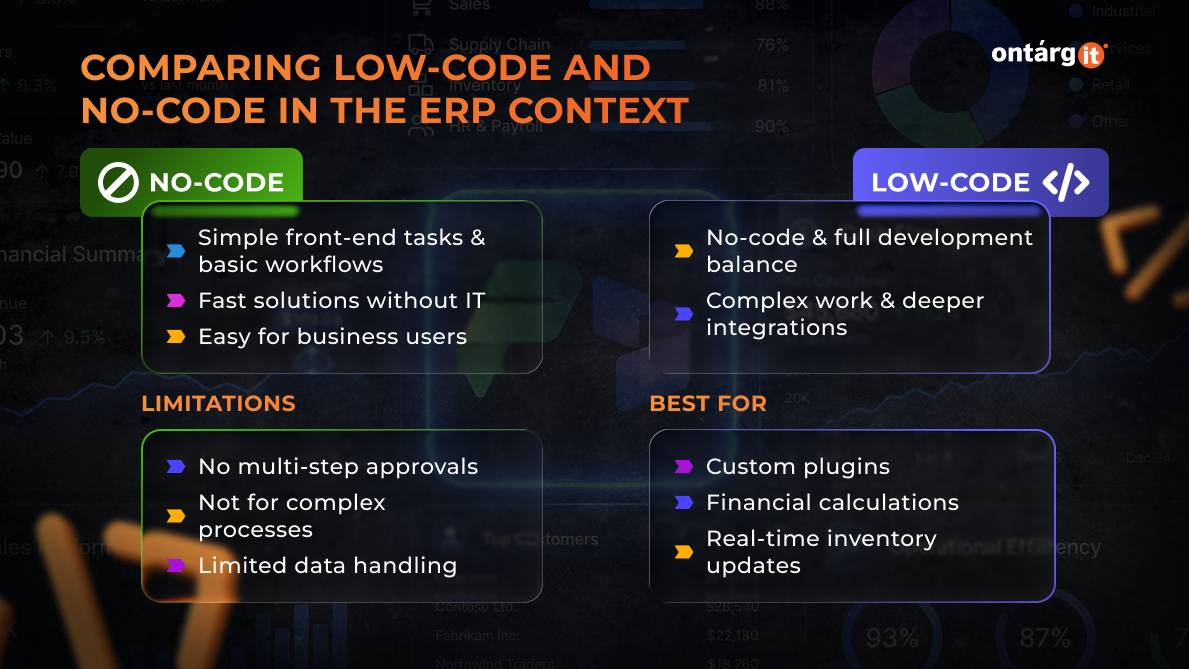
Comparing Low-Code and No-Code in the ERP Context
Choosing between Low-Code and No-Code usually depends on how complex the business process is and how much integration with other systems is needed.
No-Code works best for simple front-end tasks or basic workflows. It’s great for teams that need quick solutions without IT support. But no-code tools can struggle with more complex tasks, like handling detailed data changes, multi-step approvals, or connecting to older systems.
Low-Code is the middle ground. It lets business users build solutions while also giving IT the tools they need for more complex work and deeper integration. For example, you might use no-code to make a simple feedback form, but low-code is better for things like complex financial calculations, real-time inventory updates, or custom plugins that connect to the main database.
A platform like Power Platform is strong because it supports both no-code and low-code. You can start with a simple no-code project and make it more advanced with low-code features as your needs grow.
The Future of Enterprise Resource Planning
In short, moving from traditional ERP systems to low-code environments is a big change for businesses. Traditional ERPs are reliable but hard to set up, inflexible, and require special technical skills. They do provide a single source of truth, but this often slows down the company and makes it harder to innovate.
In contrast, a Low-Code ERP approach, like combining Microsoft Power Platform with systems such as Dynamics 365, offers a better way based on three main ideas:
- 1
Speed: You can launch secure, working solutions in weeks instead of years.
- 2
Empowerment: The people who face business challenges every day can now create their own digital solutions.
- 3
Resilience: Businesses can quickly adjust their processes when the market changes or supply chains are disrupted, without putting the main system at risk.
By using low-code automation, companies aren’t replacing their ERP—they’re making the most of it. They turn a static system into one that can grow and change with the business. This helps them stay competitive, flexible, and prepared for whatever the global market brings.