
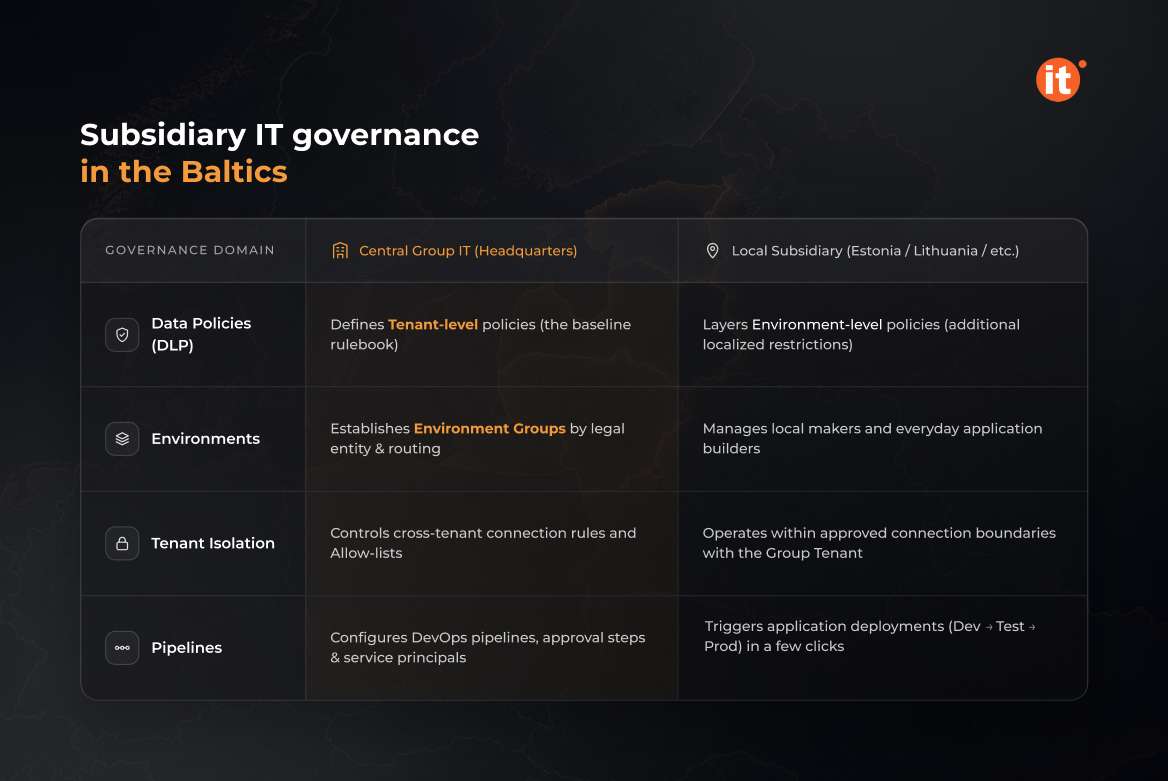
A country manager in Tallinn needs an approval app live by quarter-end. Group IT, in a different capital, needs every app in the tenant to follow the same data rules. Both requests are legitimate, and without an agreed split they collide. Microsoft Power Platform lets the two sides settle that split once, in configuration, instead of renegotiating it with every new app. Below is a map of which controls the group owns, which the Baltic subsidiary owns, and the four features that enforce the division: data policies, environment groups, tenant isolation, and pipelines.
Why Baltic subsidiaries hit the group-policy wall
Foreign ownership is a structural feature of the Baltic economy. In 2023, 10.9% of Estonian enterprises were foreign-controlled — the second-highest share in the EU after Luxembourg, according to Eurostat's foreign-controlled enterprise statistics (Eurostat, Foreign-controlled enterprises statistics – inward FATS, 2023 data). Each of those subsidiaries runs on systems its group selected. Those systems seldom cover the local sales workflow, the country approval chain, or the report the country manager needs before the monthly group call.
That gap produces two predictable outcomes. Local teams either build shadow tools in spreadsheets and personal automations, or they queue behind a group IT backlog that serves every country at once. Neither counts as subsidiary IT governance — the first ignores the group, and the second ignores the business. Power Platform offers a third route: local teams build, inside rules the group defines once. Saint-Gobain Baltic, part of an international industrial group, automated its sales process with a Power Platform application built without Dynamics 365 Sales.
Where the delegation line sits: tenant rules vs local choices
The cleanest place to draw the line is data movement. Power Platform supports tenant-level and environment-level data policies, and the two tiers map directly onto group and subsidiary. Group IT, holding the Power Platform administrator role, defines tenant-level policies that classify which connectors may share data. A subsidiary's environment admin can then add environment-level policies for the environments they manage.
The hierarchy runs in one direction only. Environment admins can't exclude their environments from tenant-level policies, and environment-level data policies can't override tenant-wide ones. The country team can layer its own rules on top of the group's, but it can never remove them. That asymmetry is what makes subsidiary IT governance workable at scale: the group sets the floor once, and each subsidiary builds on it without renegotiating the basics.
One governed space per subsidiary
Microsoft's environment groups let administrators cluster environments by organizational unit, and Microsoft names the subsidiary as one of the grouping criteria. When a tenant admin publishes rules at group level, the matching settings become read-only in every member environment, and local system administrators can't change them. Rules span sharing, AI feature enablement, data retention, and application lifecycle management.
One constraint shapes the whole design. Environment groups don't support per-environment exceptions, and they contain only managed environments. If the Lithuanian entity needs different sharing limits from the Estonian one, it needs its own group. That decision belongs at rollout, before makers have built anything that would have to move.
Environment routing closes the remaining gap. A new maker doesn't start in the shared default environment. Instead, they receive a personal developer environment created inside the group IT designates, with that group's rules applied from the first day.
When the subsidiary runs its own tenant
Not every subsidiary shares the group's Microsoft Entra tenant — some operate their own. Power Platform tenant isolation governs that boundary: with isolation on, cross-tenant connections are blocked even when the user presents valid credentials. Administrators then allow-list specific tenants for inbound connections, outbound connections, or both.
For a Baltic subsidiary on its own tenant, a workable setup is an allow-list entry for the group tenant. Sanctioned integrations with headquarters keep running, and connections to any other tenant stay blocked. Isolation covers only connectors that authenticate through Microsoft Entra ID, such as Office 365 Outlook or SharePoint. Connectors that authenticate another way fall outside its scope.
Shipping local apps through group-approved pipelines
Pipelines in Power Platform let makers deploy solutions from development to test and production in a few clicks, without receiving elevated access to the target environments. Group IT can extend a pipeline with approval steps, service-principal deployment, and integration with Azure DevOps or GitHub. The subsidiary sets the pace of delivery, and the group keeps the sign-off.
The same mechanics support a build-once, roll-out-many pattern. For L'Oréal, OntargIT built Power Fluence for Spain and Portugal with an EMEA rollout to follow. It also built the Pricing Workflow for the UK and Ireland, with Europe and South Africa planned next — part of OntargIT's Power Platform Center of Excellence work. For Aker Solutions, OntargIT combined Power Platform, SharePoint, Power Automate, and Azure DevOps to run internal reporting across a multinational corporation.
Conclusion
Subsidiary IT governance holds up when the delegation line is agreed before the first local app ships, not after the tenth. Check your current setup against the four controls above:
- whether your data policies sit at tenant or environment level;
- whether environment groups mirror your legal entities;
- whether the Baltic subsidiary shares the group tenant;
- whether local makers deploy through pipelines.
If any answer is unclear, book a free consultation — get a governance split that both group IT and the country team can sign off in one working session.