
Every tenant in Microsoft Power Platform starts with one default environment that all users share, and flows created from SharePoint always land there. Nobody designs that space—it fills up, and by the time IT moves to govern it, the work has become a migration project. Power Platform governance comes down to three decisions: environment strategy, DLP policies, and Power Platform licensing. Each constrains the other two, so they belong together, in a set order, before makers scale. Microsoft's own controls leave gaps that only the right order closes.
Why Power Platform governance can’t wait for scale
In December 2022, Gartner forecast that by 2026, developers outside formal IT departments would make up at least 80% of the user base for low-code development tools, up from 60% in 2021 (Gartner, Gartner Forecasts Worldwide Low-Code Development Technologies Market to Grow 20% in 2023, 2022). Microsoft Power Platform lowers the barrier for exactly those builders. That is why Power Platform governance is a design task, not a clean-up task. Once hundreds of apps and flows share one space, each new control means moving someone’s working solution—and the business owners of those solutions rarely agree to that quickly.
Decision one: an environment strategy that separates personal from shared work
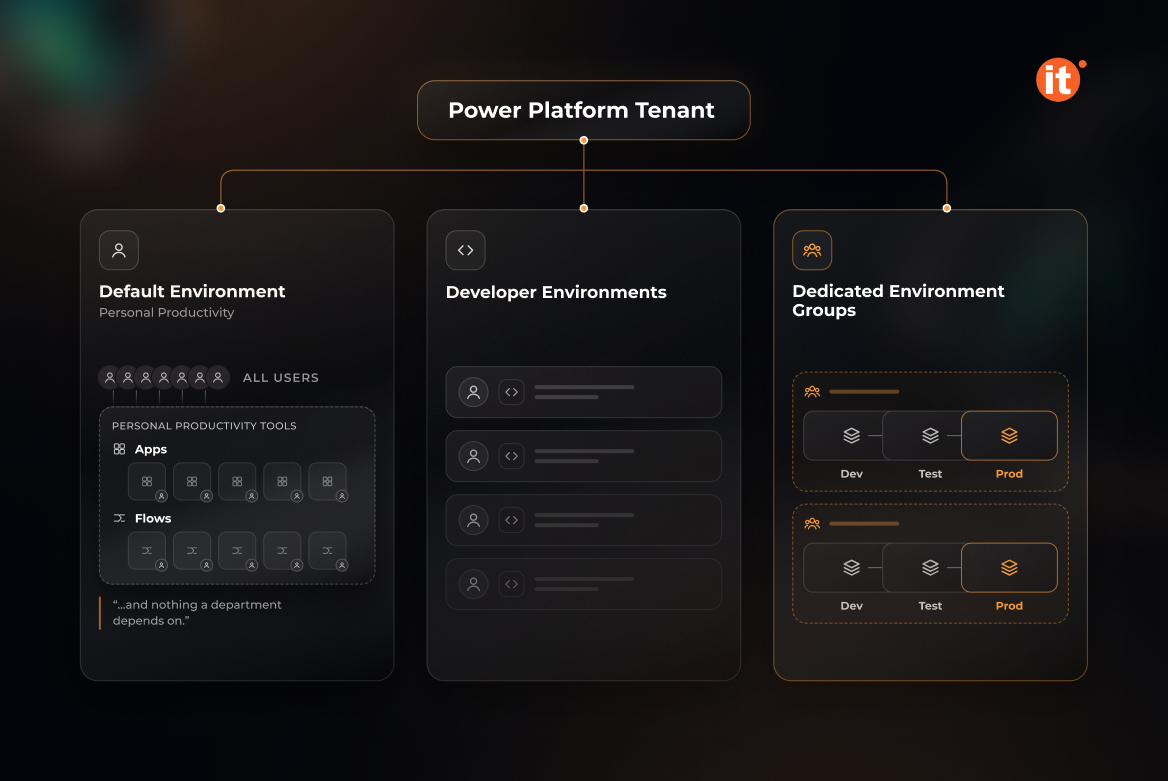
The default environment should hold personal productivity tools and nothing a department depends on. Microsoft’s tenant environment strategy builds on that separation and suggests renaming the default environment to state its purpose, such as “Personal Productivity Environment.” Business-critical solutions belong in dedicated development, test, and production environments, and default environment routing sends new makers to their own developer environments, so the shared space stops filling up. Managed Environments make this layout enforceable with sharing limits, weekly usage insights, pipelines for promoting solutions between stages, and solution checker. Environment groups apply rules to many environments at once, but only to managed ones: each environment belongs to one group, and groups cannot be nested.
Decision two: DLP policies that follow your data boundaries
Data policies (DLP) sort every connector into Business, Non-Business, or Blocked groups. Under the connector classification rules, a single app or flow can use Business or Non-Business connectors but never both, and it cannot use a Blocked connector at all. Environment-level policies cannot override tenant-wide ones. Microsoft recommends a Non-Business default for connectors added later, until someone has reviewed them.
Two limits decide how far DLP policies can carry your governance model. Microsoft-owned standard connectors can't be blocked, so they can only be classified as Business or Non-Business, not switched off. DLP policies also can't tell whether a connection points to a development, test, or production system—that separation has to come from the environment layout, which is why the two decisions cannot be designed apart.
Decision three: Power Platform licensing follows from the first two
Power Platform licensing combines standalone user licenses such as Power Apps Premium, capacity-based licenses, and pay-as-you-go meters that bill an environment's eligible usage through an Azure subscription, as the Licensing overview for Microsoft Power Platform explains. Some Microsoft 365 licenses include limited Power Apps and Power Automate rights, but only for Microsoft 365 data and standard connectors. Since 2 January 2026, the Power Apps per app plan is no longer available to new customers through some purchasing channels.
The architectural link sits in Managed Environments licensing: once an environment is managed, every active user needs a premium license or capacity add-on, including users who previously ran the same apps on Microsoft 365 rights alone. Enabling Managed Environments is therefore a Power Platform licensing decision as much as a governance one. OntargIT's software licensing services cover selecting the right licenses before that switch.
Sequence the decisions, don’t stack them
The decisions work in a fixed order:
- Design the environment topology—what stays in the default environment, which departments get development, test, and production environments, and where routing sends new makers.
- Decide which environments become managed, after checking every active user's license position.
- Write DLP policies at tenant level, adding environment-level policies only where a set of environments needs tighter rules.
Reversing the order breaks Power Platform governance predictably. A DLP policy written first cannot separate development from production. A Managed Environment enabled before the license check leaves Microsoft 365-only users needing a standalone license for apps they ran the day before. Microsoft Power Platform gives admins every control this requires; the order in which they are applied is an architecture decision, and it belongs in the rollout plan.
Conclusion
Power Platform governance holds when its three decisions are made as one design: environments separate personal from production work, Managed Environments settle who needs a premium license, and DLP policies set connector boundaries inside that layout. Review all three before the next department starts building.