
The EU harvested 257.7 million tonnes of cereals in 2024, 5.1% less than in 2023 — and the drop was uneven, with France’s cereal output down 16.6% (Eurostat, Main annual crop statistics, 2024 data). For an agri-processor, figures like these arrive as missing intake, not as a market report. Standard ERP planning assumes the company decides what to buy. In agribusiness, the harvest decides first and the plan has to absorb it. Below is how Dynamics 365 Supply Chain Management plans grower intake, multi-output processing, perishability, and seasonal demand in one master plan — and which of those choices have to be made at implementation.
Why agribusiness ERP has to plan in two directions
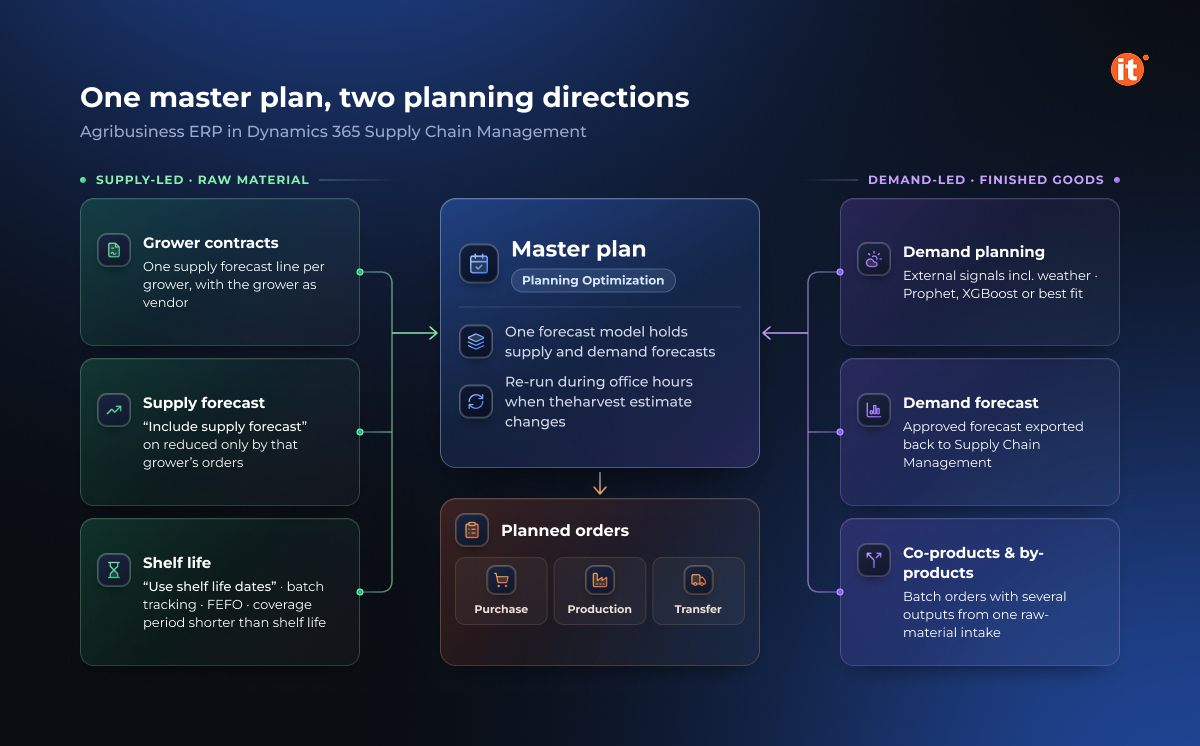
A food manufacturer that buys flour can order more when sales rise. An agri-processor’s raw intake is set by what its growers harvest — in volume, in quality, and in timing. That reverses the logic of classic material requirements planning, which starts from customer demand and works back to purchases. An agribusiness ERP has to run both directions in one plan: supply-led for raw intake, demand-led for finished goods. Deciding which items follow which logic is a design choice made when master planning is configured, and every later setting depends on it. OntargIT built its Food & Beverage ERP on this principle: its material requirements planning works from demand for finished products and from expected supply for agricultural raw material, so the agribusiness ERP reflects how the business actually buys.
Plan intake from grower contracts with supply forecasts
In Microsoft Dynamics 365 Supply Chain Management, contracted intake belongs in a supply forecast. A supply forecast records the supply you expect in a future period, and a master plan uses it when “Include supply forecast” is turned on. Each forecast line can name a vendor, so one line per grower produces planned purchase orders for that grower rather than for the item’s default vendor. Planning Optimization reduces a supply forecast only with purchase orders from the matching vendor, which keeps one farm’s delivery from cancelling out another farm’s contracted volume. It also respects default order settings such as a minimum purchase quantity. Microsoft describes the typical purpose of supply forecasts as securing a minimum quantity each period regardless of demand — the exact position of a processor with grower contracts.
Plan every output from one raw-material intake
In agricultural processing, one input becomes several products. A tank of milk, a tonne of grain, or a carcass yields more than one sellable output, and a plan that tracks only the main product leaves the others invisible until they appear in stock. Planning Optimization covers demand with supply from batch orders that output co-products and by-products, so master planning sees everything a single processing run creates. For meat, fish, and poultry, OntargIT’s Food & Beverage ERP adds catch-weight handling and registers main and secondary outputs from one raw-material unit. Planners then work with the full yield of an intake instead of one product line at a time.
Build perishability into the plan, not the warehouse
Stock that expires before it is used is not supply, and the plan has to know that. In Dynamics 365, master plans ignore shelf life by default. Each plan that needs it must have “Use shelf life dates” turned on, and the product must be tracked at the batch dimension with a shelf-life period in days. Microsoft’s guidance on shelf life in master planning assumes a first-expire, first-out (FEFO) warehouse strategy and recommends a coverage period shorter than the item’s shelf life. With that setup, demand is covered by batches that still have the required shelf life, and on-hand stock is replenished when it expires.
Re-plan the day the harvest estimate changes
Harvest estimates shift through the season, and a plan that only runs overnight is always a day behind them. Planning Optimization runs master planning outside Dynamics 365 Supply Chain Management and its SQL database, so planners can run quick plans during office hours and react to changed demand or parameters straight away. Runs are no longer limited to once a day. For an agri-processor, a revised yield estimate entered in the morning can be reflected in planned purchase, production, and transfer orders before the shift ends. Microsoft treats the older engine as deprecated, so new implementations start on Planning Optimization.
Forecast the demand side with signals, including weather
The finished-goods side still needs a forecast, and seasonal products need one that reads more than last year’s sales. Demand planning is a separately licensed app for Supply Chain Management in which planners build demand models without code and collaborate in Microsoft Teams. Since the 2025 release wave 1, demand forecasting in the app can combine multiple input signals using the Prophet or XGBoost algorithms, or a best-fit model that calculates both and picks the stronger result for each combination of dimensions. Seasonality is detected automatically, and Microsoft names weather conditions as an example of an external signal. Approved forecasts are exported back into Supply Chain Management, where one forecast model can hold both demand and supply forecasts — so demand forecasting and grower intake meet in the same master plan.
OntargIT builds its own Food & Beverage ERP on Dynamics 365, with supply-driven MRP for agricultural raw material and catch-weight handling, and has delivered 15 joint food and agriculture projects with Linkfresh. Its clients include Citadelle, a cooperative of 1,400 producer families.
Conclusion
The most consequential planning decision in an agribusiness ERP is made before go-live: which items the plan drives from expected supply, and which from forecast demand. Grower supply forecasts, batch tracking for shelf life, and co-product formulas all follow from that choice, and each needs its own master data per item. Before you configure Dynamics 365, map every raw material and finished product to its planning direction.