


The average seller spends 40% of the week selling, and Gen Z reps lose roughly two hours a week to manual data entry (Salesforce, State of Sales Report, 2026 — a global survey of 4,050 sales professionals). Phone calls generate much of that data. Whether it reaches the CRM automatically depends on a decision many teams make late: how the phone system connects to Dynamics 365 Sales. US technology companies have three documented routes — Microsoft Teams Phone, an existing cloud telephony platform connected through a framework, and Contact Center voice. Below: what each route requires, what it rules out, and five questions that pick the right one before implementation starts.
Why the telephony decision belongs in the CRM design phase
Most CRM projects treat the phone as something to connect after go-live. In Dynamics 365 Sales, that order causes rework. The telephony route decides three things: which records a call attaches to, which roles can record, and where recordings are stored. All three are configured through security roles, phone numbers, and storage settings that the rest of the implementation builds on.
The routes also exclude each other at the user level. Microsoft’s documentation states that enabling the Microsoft Teams dialer stops any telephony system connected through Dynamics 365 Channel Integration Framework from working for the users who received the Teams dialer. A company that pilots one route and later switches has to reassign roles and retest every call flow. CRM telephony integration therefore belongs on the design-phase agenda, next to the data model and the security design.
Route 1: Microsoft Teams Phone inside Dynamics 365 Sales
The native route fits companies that already run Microsoft 365 and whose sellers spend the working day in the CRM. Prerequisites are a Teams license, a configured phone system, and a PSTN connection through a Teams calling plan, your own carrier, or direct routing. Sellers then place calls from a record, a list view, or a sales accelerator work item without leaving Dynamics 365 Sales.
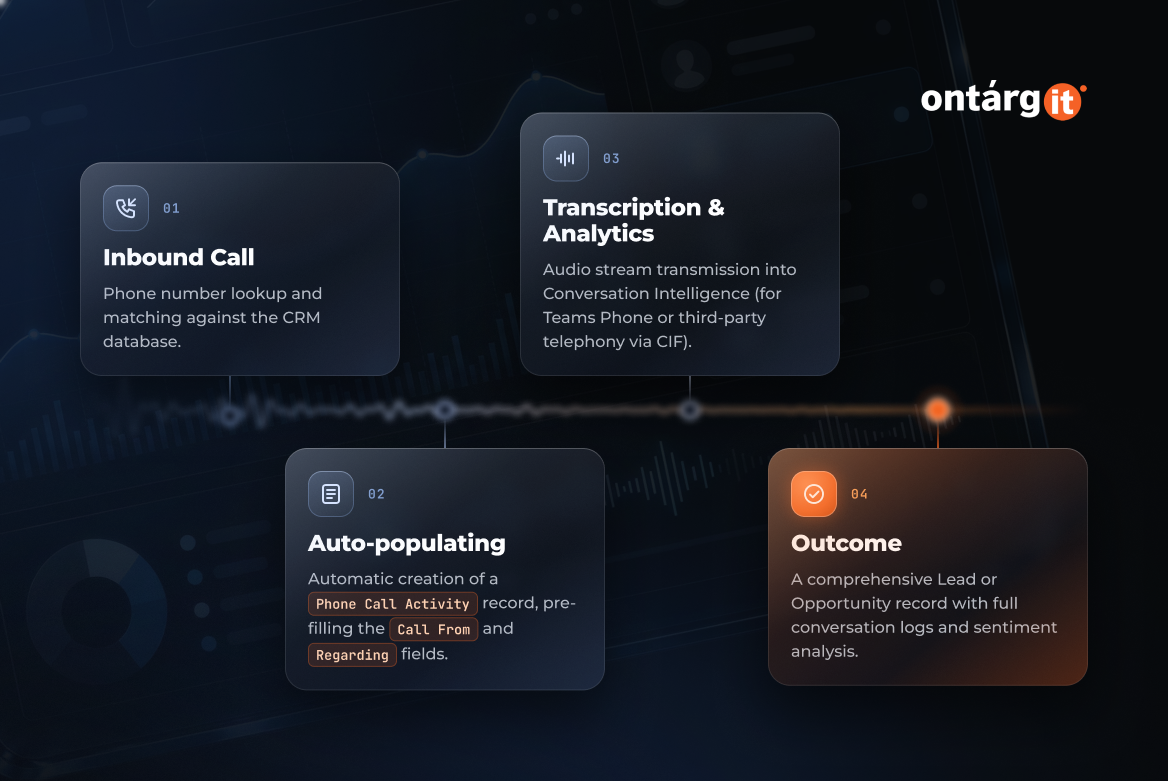
The record trail is where this route earns its place. When a call ends, a phone call activity appears on the record’s timeline and on the Activities page. On an inbound call, a number that matches a record shows the caller’s name, and the activity’s Call From and Regarding fields fill in automatically. The trade-off is the conflict described above: the Teams dialer replaces any connector-based softphone for the same users.
Route 2: Keep your cloud telephony and connect it through CIF
Many US technology companies already run a cloud phone platform whose IVR menus, ported numbers, and dialer workflows the sales and support teams depend on. Dynamics 365 Channel Integration Framework (CIF) connects non-Microsoft cloud telephony to Dynamics 365 model-driven apps, including Dynamics 365 Sales, where the provider’s softphone opens directly in the browser. The framework is provider-neutral: the telephony provider defines what the channel can do, and CIF does not govern how the channel works. In practice, you keep the phone system and change where sellers use it.
A connector does not cost you call analytics. Microsoft documents conversation intelligence for sellers on Teams or on third-party dialers, and partners can connect third-party telephony to conversation intelligence through CIF. The price of this route is dependency. The provider’s connector quality and release cadence become part of your CRM roadmap, so the connector needs the same regression testing as any other integration.
Route 3: Contact Center voice for high-volume inbound
Support lines, inbound sales queues, and renewal desks need routing and IVR more than click-to-call. The voice channel in Dynamics 365 Contact Center runs on Azure Communication Services, and direct routing lets a company keep its existing carrier and phone numbers. Microsoft’s deployment guidance draws the line clearly: its responsibility begins once a call enters Azure Communication Services or Teams, and a call transferred back to your session border controller leaves SIP context and call quality in your hands.
This route suits companies whose inbound volume justifies a queue design. Each phone number is tied to a workstream, so routing rules and carrier engineering join the project scope. Plan them before the first number is ported.
Call recording: consent, storage, and retention
Call recording is where US compliance meets CRM configuration. Federal law permits recording when the recorder is a party to the call or one party has given prior consent, unless the recording serves a criminal or tortious purpose (18 U.S.C. §2511(2)(d)). California sets a stricter bar and makes it a crime to record a confidential telephone communication without the consent of all parties (Cal. Penal Code §632). Your legal counsel sets the consent standard, and the implementation team makes sure the system enforces it.
In Dynamics 365 Sales, each recording policy applies to the security roles you select. A company that calls into all-party-consent states therefore has to reflect its consent approach in role design. Storage is the second decision. Conversation intelligence keeps recordings either in Microsoft-provided storage or in your own Azure storage, and deletes analyzed call data once the retention limit you set is reached. If audit policy requires call recording data to sit under your own storage controls, make that choice before the first call is recorded.
How to choose: a decision checklist
Five questions settle most CRM telephony integration decisions:
- Where do your phone numbers live today? If they sit in Microsoft Teams, Route 1 is the shortest path; if they sit with another cloud provider, Route 2 avoids a migration.
- Who makes most of the calls? Sellers working a pipeline fit Route 1 or Route 2, while agents working a queue fit Route 3.
- Who must own the recordings? If policy requires your own storage, configure conversation intelligence for your Azure storage before go-live.
- Which states do you call into? If the list includes all-party-consent states such as California, design recording policies by role from the start.
- Do you need queues and IVR? If so, scope Route 3 for the teams that handle inbound volume.
The Teams dialer conflict is documented at the level of individual users, which leaves room for a split design. For example, sellers could run on one route while a support team runs on another. OntargIT’s sales automation package for Dynamics 365 Sales lists telephony among its standard processes, so this choice is part of the project plan from day one.
Conclusion
The telephony mistake to avoid in a Dynamics 365 Sales project is choosing the route after roles, numbers, and recording policies are already configured. Settle it in the design phase. Map where your numbers live, who makes the calls, which states you call into, and who owns the recordings. Then pick Route 1, 2, or 3, or split by team.