
In 2023, the 2,400 largest agricultural holdings in Estonia produced 93% of the country’s agricultural output, and the average Estonian holding farmed 91 hectares against 29 in Latvia (Statistics Estonia, Farm Structure Survey 2023). A dealer selling into that market serves fewer, larger customers who run machines as fleets — and who expect the dealer to know each unit’s history without searching for it. Whether the dealer can answer depends on four decisions made when Dynamics 365 is implemented: how serial numbers are tracked, how costs attach to each machine, how service history links to the sale, and which integration connects the field to finance.
Where dealer systems lose track of the machine
Picture a dealer that sells a combine and then meets it again as three different records. The sales team enters it on an order, the parts counter knows it by model, and the workshop opens a job card when the first fault appears. Each record carries a serial number, typed in by a different person at a different point in the machine’s life. When a warranty claim goes to the manufacturer, someone has to prove which unit was sold, when, to whom, and what was repaired — and that proof is assembled from three places by hand. An agricultural machinery ERP closes this gap only if the serial number becomes the record every department shares. That makes serial number tracking a data-model decision, settled before configuration starts.
The first decision: track every unit, or capture serials only at sale
Microsoft Dynamics 365 Supply Chain Management offers two ways to handle serial numbers, and the choice shapes how the whole dealership works. Microsoft positions the lighter option, Active in sales process, for companies that want serial numbers for service and warranty purposes without maintaining them in inventory from receipt to issue. Serial numbers are registered on the packing slip or invoice at the moment of sale. The documentation spells out the trade-off: on-hand inventory isn’t tracked per serial number, so the dealer can’t see which specific units are in stock.
For whole goods — tractors, combines, sprayers — that trade-off rarely holds up. A dealer with machines spread across several yards needs to know which unit is in which warehouse before a customer calls. Full serial number tracking, with physical inventory active on the tracking dimension group, keeps each machine identifiable from goods receipt to delivery. It also makes item tracing useful: Supply Chain Management can trace historical inventory transactions forward or backward by item number and serial number, but only for transactions that recorded the serial in the first place.
Cost and margin per machine, not per invoice
Imported machines carry freight, customs duty, and insurance on top of the purchase price. The Landed cost module in Dynamics 365 Supply Chain Management handles these costs at shipment level: it estimates them against an inbound voyage and apportions them across the contents of a voyage or shipping container by a method the dealer selects, such as volume. That puts the cost onto the items in the shipment.
Margin per machine needs one more step. In OntargIT IDMS, its dealer management solution for automotive importers, OntargIT uses the vehicle identification number as a financial dimension and allocates delivery, duty, insurance, and quality-control costs to each vehicle. The same design carries over to an agricultural machinery ERP, where the serial number plays the role of the VIN. Finance teams then see the margin on a specific combine at the moment of sale, instead of reconstructing it from averages at month-end.
Service history that follows the machine into the field
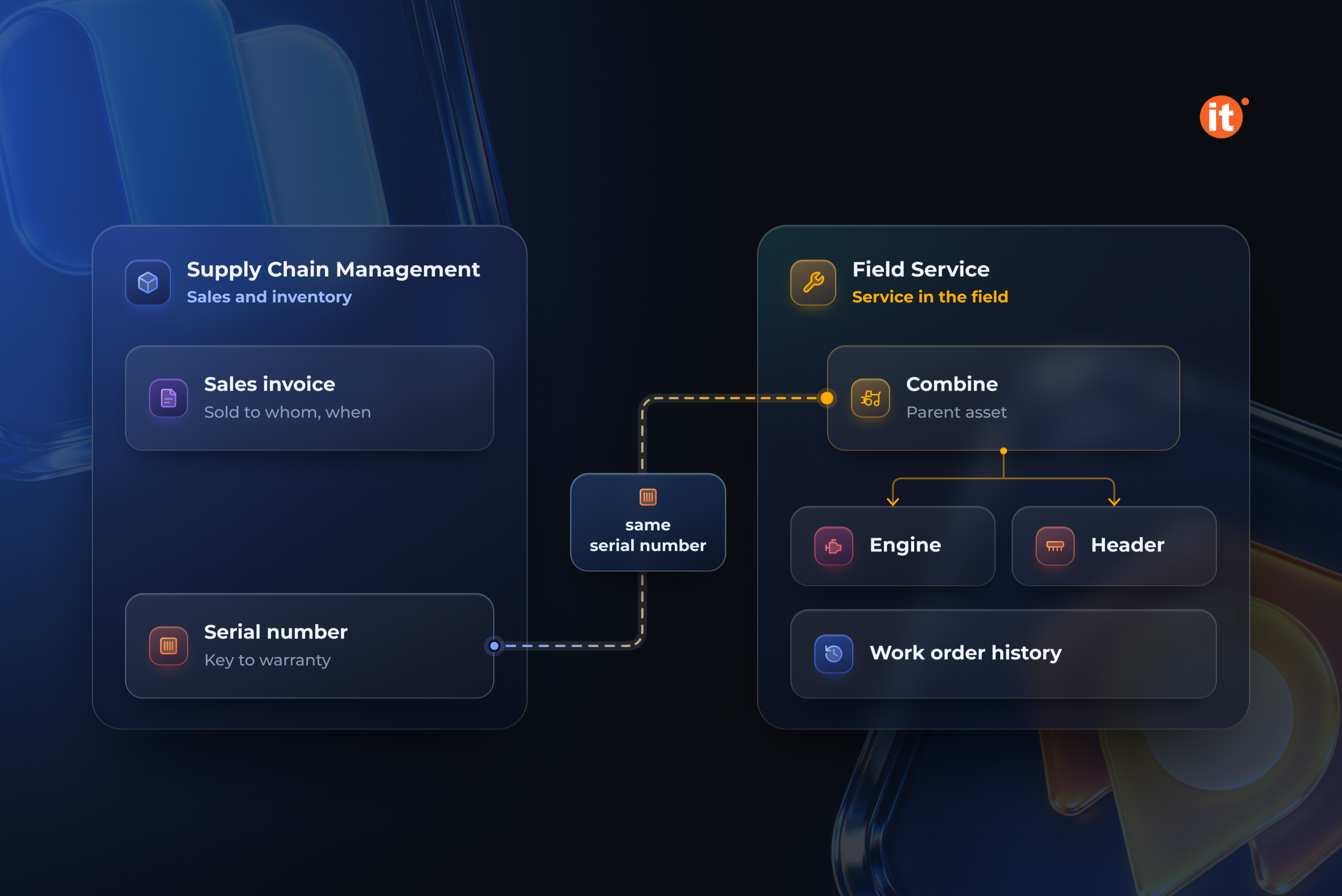
Dynamics 365 Field Service tracks customer equipment as customer assets, and each asset record holds the service history of all past and present work orders. Assets can be arranged in hierarchies — a combine as the parent, with its engine and header as child assets. A technician opening a work order sees the asset and its service history before reaching the farm.
The customer asset in Field Service and the serial number on the invoice in Supply Chain Management are separate records. Deciding when the asset is created — at delivery, at pre-delivery inspection, or by bulk import of the existing fleet — and making sure it carries the same serial number is implementation work, not a default. Done well, a warranty question has a short answer. The serial number traces back to the sales invoice, which shows whether the dealer sold that unit and whether its service or warranty obligations still apply.
Choose the integration that will still exist in 2027
Two Microsoft integrations connect Dynamics 365 Field Service to finance and inventory, and only one has a future. The Field Service integration with finance and operations applications won’t be available after 28 February 2027, and it doesn’t support serial or batch tracking dimensions out of the box. Since Field Service release 8.8.139.398, it can no longer be switched on in environments where it isn’t already installed.
Its replacement is the Field Service and Project Operations integration. With Finance as the system of record for inventory, serialized products follow the Supply Chain Management tracking-dimension framework. The serial number field appears on the work order product, flows into the material usage log when the technician records usage, and quantity is fixed at 1 for each serialized line. A serialized part fitted to a customer’s tractor becomes traceable in the same way as the tractor itself.
The licensing implication belongs in the budget conversation early. The integration can run with Field Service, Finance, and Supply Chain Management without the Project Operations application, but the user who installs it needs a Project Operations license. A new implementation should start on this integration rather than plan a migration in 2027.
OntargIT has built serial-level dealer models for automotive importers and their networks: Winner Imports runs Dynamics 365 Finance, Supply Chain Management, and OntargIT IDMS across 47 dealer centers, and MAN Truck & Bus Ukraine uses IDMS for distribution and dealer management.
Decide the serial-number model first
Before a Baltic dealer configures a single warehouse, it should decide what the serial number is: a field captured at the point of sale, or the record that carries cost, stock location, and service history for each machine. For tractors and combines, the second answer is the one that holds up when a warranty claim or a margin question arrives.