
Every FMCG manufacturer on SAP runs a second process next to it. A key account manager’s promo agreement sits in a spreadsheet, a price change waits for finance sign-off in an inbox, and a free-goods order is approved by reply-all. SAP records the outcome; the decision happens somewhere SAP cannot see.
For FMCG manufacturers in the Netherlands and across Europe, the practical fix is a set of Microsoft Power Platform apps that run the approval and post the result back to SAP, while SAP stays the only system of record. Four questions decide whether Power Platform SAP integration works: which processes to move, what “on top of SAP” means, which connector to use, and how to govern and license the result.
Where FMCG processes slip out of SAP
FMCG manufacturers rarely lose control of their SAP transactions. They lose control of the decisions made before those transactions exist. A price change needs sign-off from sales, finance, and category management before it reaches SAP. A promo agreement with a retailer is negotiated, approved, and later settled. A zero-priced order for samples or a trade event needs a reason and a manager’s approval.
Each of these is a set of approval workflows with many participants and few transactions. SAP GUI is a poor fit for a regional sales manager who approves a handful of requests a week, so the work moves to Excel, email, and SharePoint lists. Country-specific label and legal text follow the same path, as do orders for branded in-store displays. These are the process types OntargIT has rebuilt on Microsoft Power Platform for L’Oréal across Europe.
What “on top of SAP” means — and what it rules out
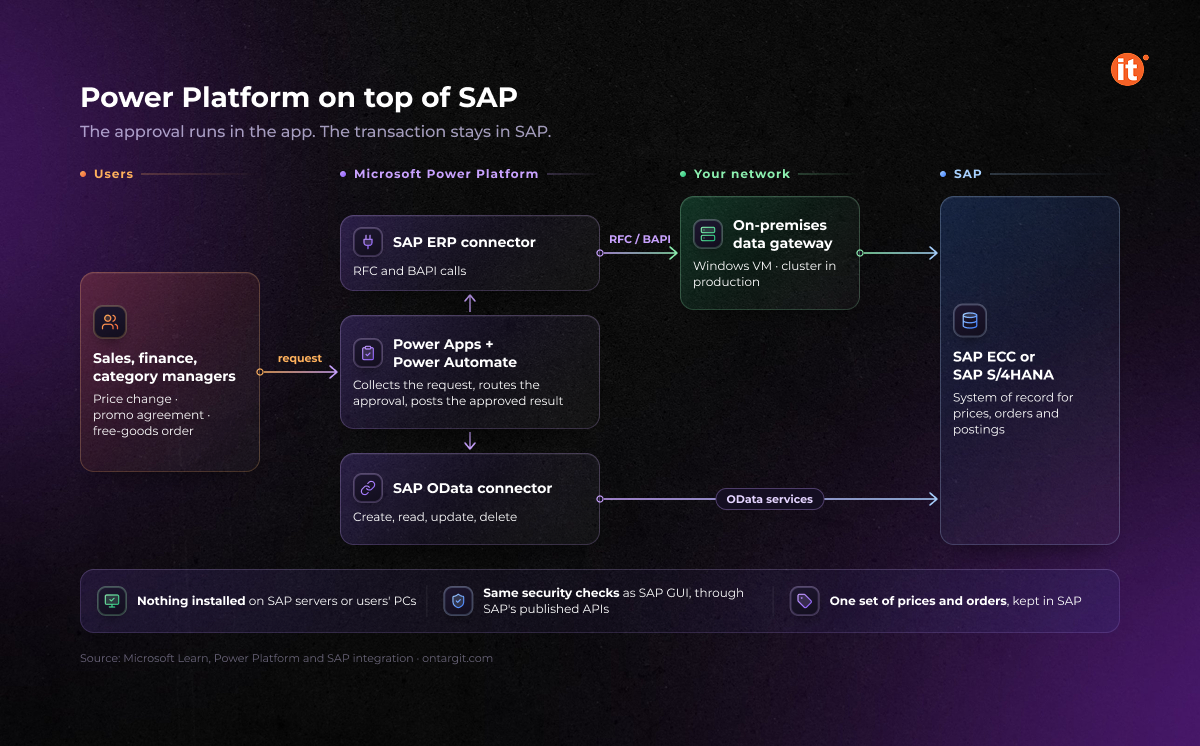
A Power Platform SAP extension keeps SAP as the system of record. The app collects the request, routes it for approval, and posts the approved result to SAP through SAP’s published APIs. What it rules out is a second set of prices or orders that finance has to reconcile at month end.
The footprint on the SAP side is small. Microsoft states that nothing has to be installed on SAP servers or on users’ PCs; the integration runs through an on-premises data gateway on a Windows virtual machine with at least 8 GB of RAM, set up as a cluster for production. Access control stays where it is. SAP’s published APIs perform the same security checks as SAP GUI, and flows can query a user’s SAP authorization objects to show or hide fields and buttons in the app.
Two connectors, one architecture decision
Microsoft offers two connectors for Power Platform and SAP integration. The SAP ERP connector calls RFC and BAPI functions through the gateway and supports SAP releases from R/3 onward, including SAP ECC and SAP S/4HANA. It is a Premium connector in Power Apps, Power Automate, and Copilot Studio.
The SAP OData connector creates, reads, updates, and deletes entities in SAP OData services, with the same Premium classification. Which connector carries a given process depends on the APIs SAP exposes for it. That makes the choice part of solution design, settled before the first app is built rather than discovered in testing.
The pattern in practice: replacing SharePoint, Nintex, and email
At L’Oréal, OntargIT builds these extensions on Microsoft Power Platform, integrated with the company’s SAP ERP landscape. Pricing Workflow replaced SharePoint for price authorization in the UK and Ireland, adding a six-level product hierarchy, delegations, and notifications over a six-month project. Free Order Management replaced a SharePoint and Nintex workflow for zero-priced orders with dynamic approval, also in the UK and Ireland, over 13 months.
Retail Wall Units Ordering replaced Excel and email for ordering branded stands in Germany with a Power Pages portal integrated with SAP, delivered in four months. Phoenix redistributes unsold products across countries using SAP ECC and product information management (PIM) data, and a rollout to the Netherlands is planned. In each case, informal approval workflows moved into an app while SAP kept the transaction.
Governance and licensing are decided before the first app
The first SAP-connected app rarely exposes weak governance; the tenth does. Environments, data loss prevention policies, and application lifecycle management through Azure DevOps need to be in place before a Power Platform SAP landscape grows. That is the model OntargIT runs as L’Oréal’s Power Platform center of competence, together with a shared component library.
Licensing belongs in the same conversation. Microsoft’s integration FAQ lists a Power Apps Premium license and an SAP indirect named user license for each user, and existing SAP direct named user licenses also qualify. For FMCG manufacturers, the production gateway also matters: a cluster of Windows VMs removes the single point of failure between every app and SAP.
OntargIT has been L’Oréal’s long-term digital partner since 2022 and acts as its low-code center of competence in Europe, building Power Platform solutions integrated into the company’s SAP ERP landscape.
Conclusion
Start with a list. Every approval that leaves SAP today — price changes, promo agreements, free-goods orders, label sign-offs — is a candidate for a Power Platform SAP app that keeps SAP as the record. Rank the candidates by how much email and spreadsheet traffic they generate, settle the connector and governance choices once, and build the first app on that foundation.