
As Microsoft adds more tools, many users find it hard to tell the different AI options apart. Knowing how these tools differ helps you pick the right one for your business and get more out of AI than just simple chat features.
Introduction to Microsoft AIs
It’s actually not that complicated to comprehend the difference when we rate them by skills required and AI’s role:
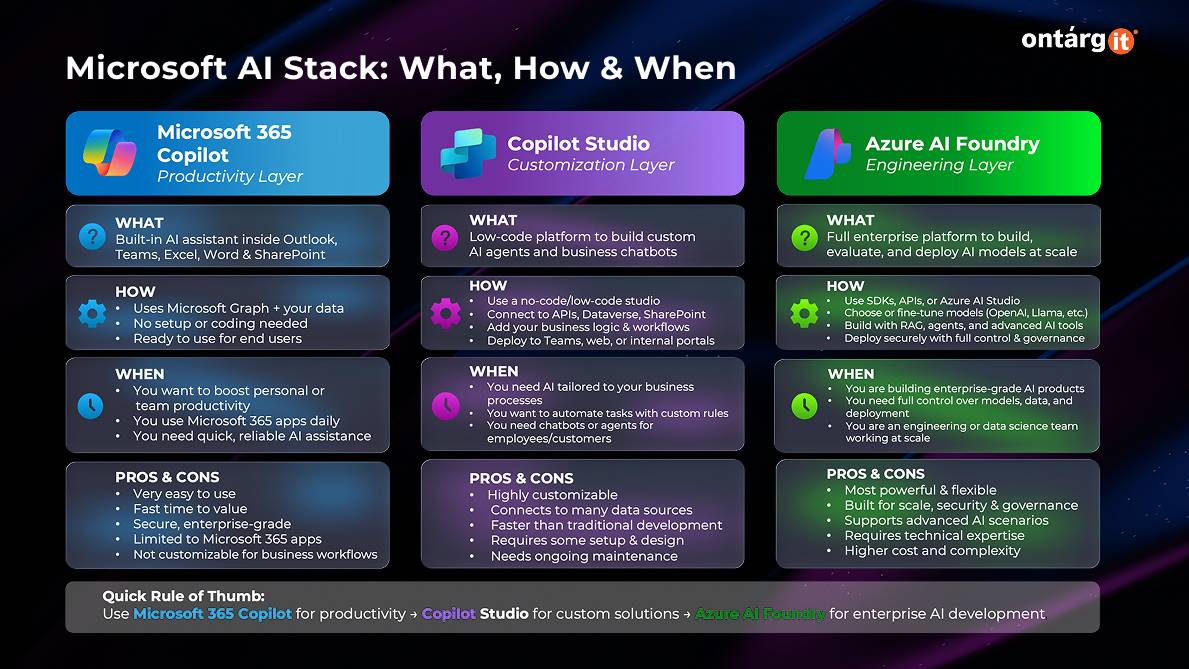
Microsoft Copilot (Ready-to-Use AI)
Microsoft Copilot is designed for immediate productivity without the need for custom development. It is integrated directly into applications such as Word, Excel, and Teams to help users generate content, analyze data, and summarize meetings in real time. This version is ideal for businesses looking for “out-of-the-box” AI capabilities that require zero configuration to start delivering value to employees.
Azure AI (Pro-Code Development)
Azure AI is the foundation of the stack, providing professional developers with the tools and models needed to build, train, and deploy bespoke AI solutions at scale. It offers access to advanced Large Language Models (LLMs) and provides the infrastructure for “pro-code” scenarios that require deep integration and custom model fine-tuning. This layer is essential for creating high-performance, specialized AI applications that go beyond the capabilities of standard low-code tools.
Copilot Studio (Low-Code Customization)
Copilot Studio is a low-code conversational AI platform that allows organizations to customize Microsoft Copilot or build their own standalone agents. It empowers business experts and IT developers to create tailored experiences by connecting AI to specific enterprise data sources and custom workflows. Users can design complex conversational flows and manage the entire lifecycle of an agent within a single, intuitive interface.
Copilot Studio is a powerful tool for building custom AI, and the “Agent in a Day” workshop shows you, step by step, how to use it effectively.
“Agent in a Day”: A workshop designed to help you master Copilot Studio
Agent in a Day is a hands-on beginner workshop for business experts and IT developers. It helps you quickly respond to customer and employee needs. In this session, you will learn how to build, test, and publish intelligent agents with Microsoft Copilot Studio in just one day. You will also see how to automate business tasks, connect to various data sources, and use agent features without needing to write much code.
Building Your First Agent in Copilot Chat
In this introductory module, participants learn to use the basic Agent Builder within the Microsoft 365 Copilot Chat interface to create a simple knowledge agent. Users practice configuring an agent with basic instructions and uploading a document to ground the agent’s responses in specific corporate data. It focuses on refining agent instructions, setting “guardrails” for professional behavior, and ensuring the agent only answers questions based on authorized data sources.
Enhancing Agents with Knowledge Sources
Participants dive deeper into data integration by connecting their agents to live Dataverse tables to track real-time order statuses and customer requests. This session teaches how to use synonyms for column names and troubleshoot data access permissions to ensure the agent provides accurate, personalized information.
Building Autonomous Agents and Tools
The final module focuses on leveling up the agent by adding tools and actions that allow it to operate autonomously, such as initiating order cancellations or handing off tasks to other specialized agents. Attendees learn to use generative orchestration, which allows the agent to decide which tool to use based on the user’s intent without a predefined path.
Conclusion
Microsoft Copilot Studio is an exceptionally powerful tool because it democratizes AI development, allowing anyone to turn organizational knowledge into actionable, conversational intelligence. However, the true value of these tools is only realized through proper training. Attending the “Agent in a Day” workshop is the best way to gain hands-on experience, learn best practices for data governance, and walk away with a functional prototype that can immediately impact business productivity.