
According to Salesforce’s sixth State of Sales report (2024), sales reps spend 70% of their time on tasks unrelated to selling. A significant share of that time disappears not in prospecting or proposal work, but in chasing information that already exists somewhere in the company. A seller calls the warehouse to check availability. They email finance to confirm whether a price is still valid. They wait a day to find out whether last week’s order shipped. None of this is selling. All of it is a symptom of CRM and ERP running as separate systems.
The problem isn’t the people — it’s the handoff. When the data a seller needs to close a deal lives in a system they can’t access from their CRM, every stage of the sales process slows down. Quotes get built on outdated pricing. Orders get re-keyed by hand from CRM records into ERP. Errors accumulate at each transition. Connecting Dynamics 365 Sales to Dynamics 365 Finance and Supply Chain Management eliminates that handoff entirely.
How the Lead-to-Invoice Path Works in a Connected D365 Environment
Dynamics 365 Sales manages the early sales cycle: leads, opportunities, activities, and pipeline. A seller qualifies a lead, converts it to an opportunity, and tracks engagement — all within CRM. This phase is self-contained in Dynamics 365 Sales and does not require ERP involvement.
The integration with Dynamics 365 Finance and Supply Chain Management becomes relevant at the commercial transaction stage, once a prospect or customer enters the quotation process. From that point, Microsoft’s standard quote-to-cash capabilities can carry the process through quotation, order submission, fulfillment, and invoicing. The two phases are distinct in Microsoft’s architecture, and it’s worth understanding where one ends and the other begins before assuming the full path is covered by a single mechanism. Also, it’s worth noting that this level of integration is available within the Microsoft ecosystem, though connecting Microsoft CRM to another ERP will require adaptations for your specific system.
Pricing and Product Data the Seller Doesn’t Have to Chase
Products, price lists, units of measure, and discount structures are synchronized from Dynamics 365 Finance and Supply Chain Management to Dynamics 365 Sales through dual-write — Microsoft’s near-real-time, bidirectional integration framework. When a seller opens a quote and selects a product, they work with the same SKUs and prices that the ERP already governs. There is no parallel spreadsheet to reconcile, and no call to the pricing team for standard catalog items.
Dynamics 365 Supply Chain Management can be configured as the pricing source for Sales, meaning that when a seller adds a line to a quote or order, SCM calculates the price and discount, and the result is returned directly to the CRM record the seller is working in. Two pricing modes then give precise control: “Use Current Pricing” keeps the line tied to the live catalog, while “Prices Locked” freezes the agreed price on the order or invoice regardless of subsequent catalog changes.
These are standard Microsoft capabilities. They require implementation, but the integration foundation is already provided. But again, this will work only within the Microsoft system, and any integration with a non-Microsoft ERP is more complicated.
The Moment the Order Leaves CRM and Enters ERP — Without Anyone Touching It
When Sales Order Processing integration is enabled, a submitted order in Dynamics 365 Sales is automatically synchronized into Dynamics 365 Finance and Supply Chain Management, and the CRM record is locked for editing at that point. This lock prevents the CRM and ERP records from diverging once fulfillment begins.
Quotes, orders, and invoices are related sales transaction records that carry forward shared customer, product, pricing, discount, freight, and tax data through the sales process. A seller can track fulfillment status and invoice information from within Dynamics 365 Sales as Supply Chain Management and Finance update those records on their side. The account manager knows whether an order has shipped or been invoiced before the customer calls to ask — without requiring access to the ERP.
What Changes If the ERP Is Not Dynamics 365 Finance or Supply Chain Management
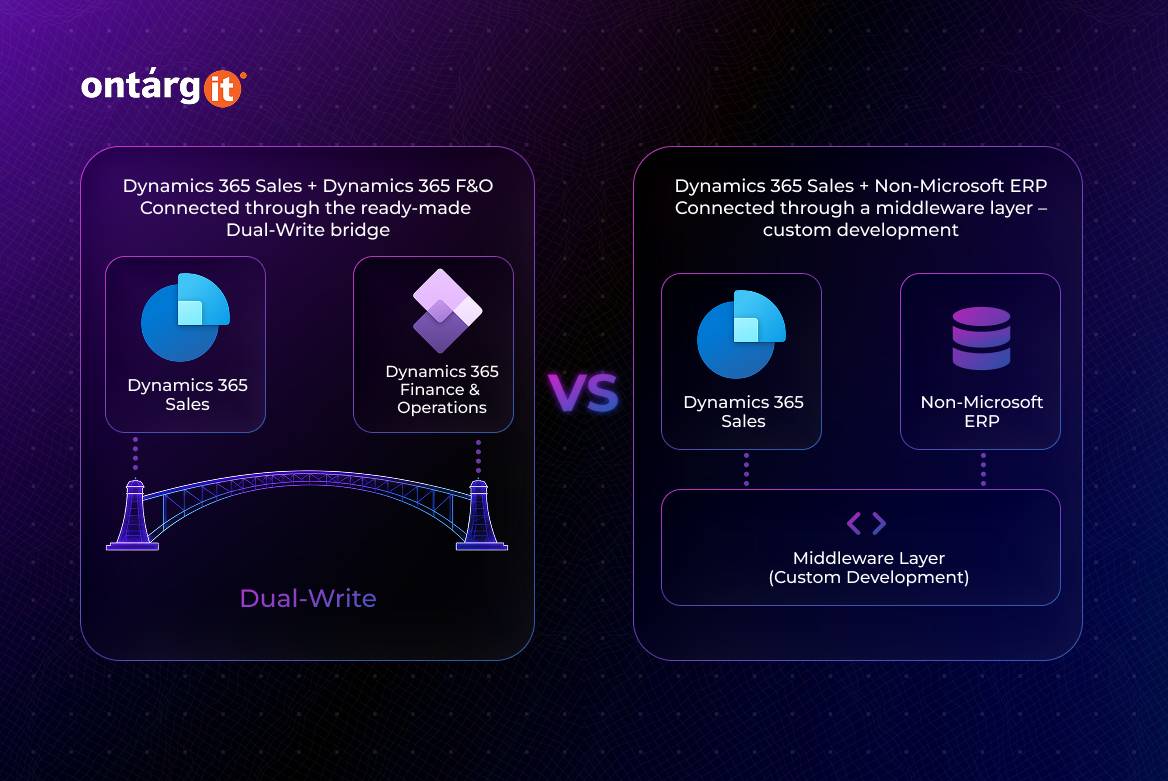
The scenario described above is specific to the Microsoft-to-Microsoft stack. When Dynamics 365 Sales is paired with Dynamics 365 Finance and Supply Chain Management, standard dual-write mappings and quote-to-cash capabilities provide a solid foundation for integration.
When the ERP is another non-Microsoft system, Dynamics 365 Sales can still support the front-office sales process — but the integration must be designed separately. Pricing calls, inventory availability, order submission, invoice status, payment status, and edit-locking logic must all be implemented via the ERP’s APIs, middleware, Dataverse plugins, Power Automate, Azure Integration Services, or another integration layer. Dynamics 365 Sales remains the seller’s workspace, but the quote-to-cash automation depends entirely on the custom integration architecture built around it.
What This Means for the Sales Team in Practice
The operational shift is specific. A seller can answer a buyer’s availability question on the call rather than promising to follow up. A quote on standard catalog items doesn’t require a separate pricing sign-off loop. An account manager knows whether an order has shipped or been invoiced before the customer rings to ask.
These capabilities are standard Microsoft capabilities, but they still require implementation: enabling dual-write, configuring table maps, synchronizing master data, defining pricing ownership, aligning products, units of measure, customers, legal entities, warehouses, taxes and security roles.
Conclusion
The bottleneck in most sales cycles isn’t the seller — it’s the wall between CRM and ERP. For companies running Dynamics 365 Sales alongside Dynamics 365 Finance and Supply Chain Management, Microsoft provides a standard integration foundation that removes that wall without building one from scratch. For companies using a different ERP, the same business outcome is achievable, but it requires a deliberate integration design rather than configuration of existing mechanisms.