

Let’s imagine an educational website has a problem: many users contact human support. However, many questions can be answered with the information on the website, and waiting for feedback takes a long time.
The solution is in Copilot Agent. Users first seek help from the chatbot, and only in the case of serious problems are they escalated to human support. It minimizes the human effort required to answer questions, and many users will receive answers quickly because the Agent is not tied to working hours and operates 24/7.
Brief about Copilot Agent
This is an AI-powered assistant that can manage various tasks and help businesses enhance productivity. Generally, Copilot Agent is a chat agent with an Artificial Intelligence module that can communicate with users in natural language.
In the picture below, we can see a more explicit example of Copilot’s work. The Facility Service Agent searches the Order table in the business database, extracts user-relevant information, and presents it in an intuitive format.
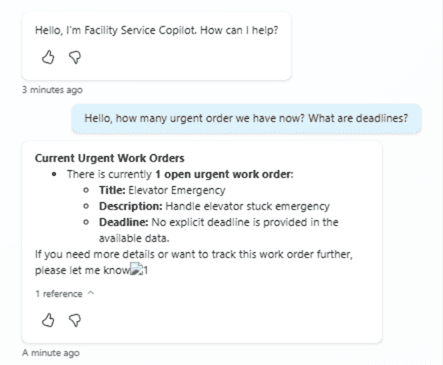
Photo by OntargIT
As a result, the user receives useful information within seconds. As an alternative to such action, a user can search a business database, but it will take them longer to find a table, filter it, and generate a report. Consider Copilot Agent as a unified space where users can freely collaborate with the Agent to perform many business actions, saving time despite manual work.
How is Copilot Agent restricted by the business organization?
Copilot Agent can adapt to various business scenarios. To correctly set the Agent, consider the following three factors:
Which information can the Agent use? – Set the data source
Copilot Agent can use many different data sources for various types of data, including websites, tables, and documents, etc. It allows the Agent to be aligned with up-to-date business or public information and follow relevant guidelines.
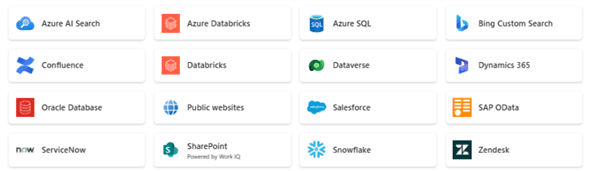
Photo by OntargIT
Copilot Agent can not only read data but also change it. For example, if the business stored data in Dataverse, the Agent can modify it if allowed.
Which tasks to perform? – Give the Copilot platform
Copilot Agent can connect to different platforms to create actions there. It can modify data, send emails, create tasks, and more.
Here is the list of the most popular platforms the Agent could connect with:
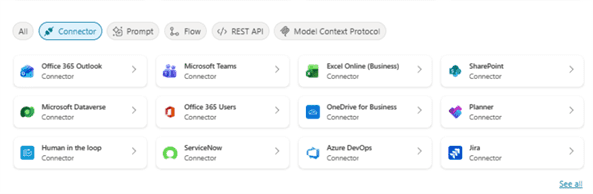
Photo by OntargIT
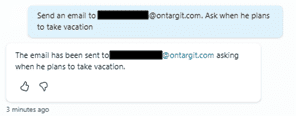
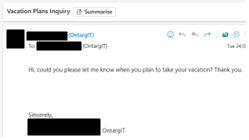
Below is an example of interaction with Copilot Agent where the user asks for the action – send an email – and the results.
Input
Output
Which users can use it? – Choose the channel
The access to Copilot Agent can be defined using channels. Channel is a place where the Copilot Agent can be located. It can be an internal platform like MS Teams for employees, or publicly accessible on the website.
Below is the list of the allowed channels:
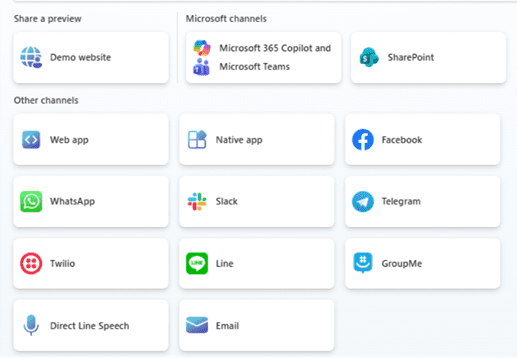
Photo by OntargIT
4 Benefits for Business
Better than just a chatbot – Autonomous Agent
It is a Copilot Agent itself, but this is the part of the functionality that does not communicate with users. An autonomous agent can still accomplish different tasks. However, it does not do so at the user’s request, but only when the Agent itself determines it is necessary. Businesses can decide what the Agent should do in certain situations.
The example from day-to-day life – you receive many emails every day. Some of them are advertisements, and others are very important and may contain invitations to cooperate. From that big scope, you do not have time to sort it out, what matters and what does not. That’s where Copilot Agent can sort emails using native language and then transmit only relevant emails to the user in a convenient format.
Autonomous Agents in a Single Workspace – Agent Feed
The unified place where users can track the work of many Autonomous Agents – how they accomplish the work, summarize actions taken, and even approve or reject taken actions.
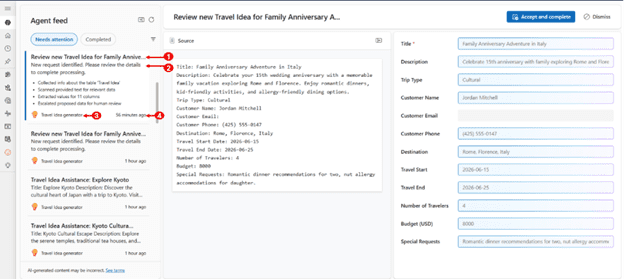
Here is an example taken from Microsoft documentation
We can see that the business is a travel agency where agents gather useful travel information and propose interesting routes and destinations. Users can review proposed ideas, correct them, and approve or reject them for use. This way, the AI Agent generates new ideas that play a significant part in business improvement.
Summary
Copilot Agent is an AI chatbot designed to help users with their routine by minimizing the effort spent. Can assist many users at once, having access to the most current information and having the ability to accomplish different tasks.
Autonomous Agent and Agent Feed are AI bot that performs manual tasks on their own. They can accomplish many tasks without user intervention, saving the resources spent on manual tasks.