

Most of the inventory deviation traces back to the same root cause: demand signals that arrive too late, travel through too many manual steps, or sit in systems that don’t talk to each other.
Dynamics 365 Supply Chain Management addresses this at the architecture level — not through a single feature but through a set of configurable modules: Demand Planning, Planning Optimization, coverage groups, safety stock parameters, and the Inventory Visibility add-in. Each handles a distinct part of the planning problem.
Two Layers, One Planning Engine
The Demand Planning is where planners build, compare, and approve forecast scenarios. It operates as a standalone module with its own data ingestion layer, transformation logic, and forecast profiles. Once a forecast is approved, it moves downstream into master planning, where Planning Optimization converts it into purchase and transfer orders.
Planning Optimization moves MRP calculations into a dedicated in-memory microservice. For most retail environments, that architecture reduces planning run times from several hours to a fraction of that — enough for planners to trigger a run mid-afternoon and see updated replenishment proposals before the warehouse closes. At very large scale — millions of item-warehouse combinations with complex transfer chains — run times will be longer.
Forecast Models and What Retail Data Requires
The Demand Planning offers four forecasting algorithms: auto-ARIMA for stationary historical data, ETS for trend and seasonality patterns, Prophet for complex real-world signals including promotions and holidays, and XGBoost for multi-input forecasting. For most retail SKU portfolios, the Best-fit model is the practical default — it automatically selects the right algorithm for each product-by-dimension combination, avoiding the distortion that occurs when a single model is applied across all categories.
This configuration involves category managers and supply planners, not just the IT team. The way a business segments its product hierarchy determines what the forecast engine processes and at what granularity.
Coverage Groups: Where Replenishment Rules Live
Coverage groups govern how master planning generates planned orders per product family. D365 SCM offers five coverage codes: Min/Max, Period, Requirement, Priority, and Decoupling point (DDMRP). Min/Max handles staple categories: a planned order fires when projected stock falls below the minimum and is sized to restore the maximum.
Planning Optimization prioritizes the most critical replenishment orders and can split larger order batches by priority range, preventing low-urgency planned orders from consuming supplier capacity before a critical stockout replenishment.
Safety Stock Configuration at Store Level
Safety stock is defined per item, per site, and per warehouse, so each store location holds a different minimum for the same SKU. A flagship store and a regional convenience outlet carry different risk profiles — the system reflects that without manual workarounds at each planning cycle.
A planner sets period-specific multipliers — higher minimums ahead of Q4, lower in January — and Planning Optimization applies them at each run without requiring manual updates before each period.
The Safety Stock Journal calculates minimum quantities from usage history and writes them to the Item Coverage page for planner review before posting. Separately, for perishable and date-sensitive categories, FEFO (first expired, first out) sequencing is configured through Item model groups — the parameter that controls whether warehouse picking and reservation logic follows expiry date order. FEFO is a warehouse execution setting; it operates independently of the Safety Stock Journal but works alongside it in the same planning environment.
Inventory Visibility Add-in: The Real-Time Layer
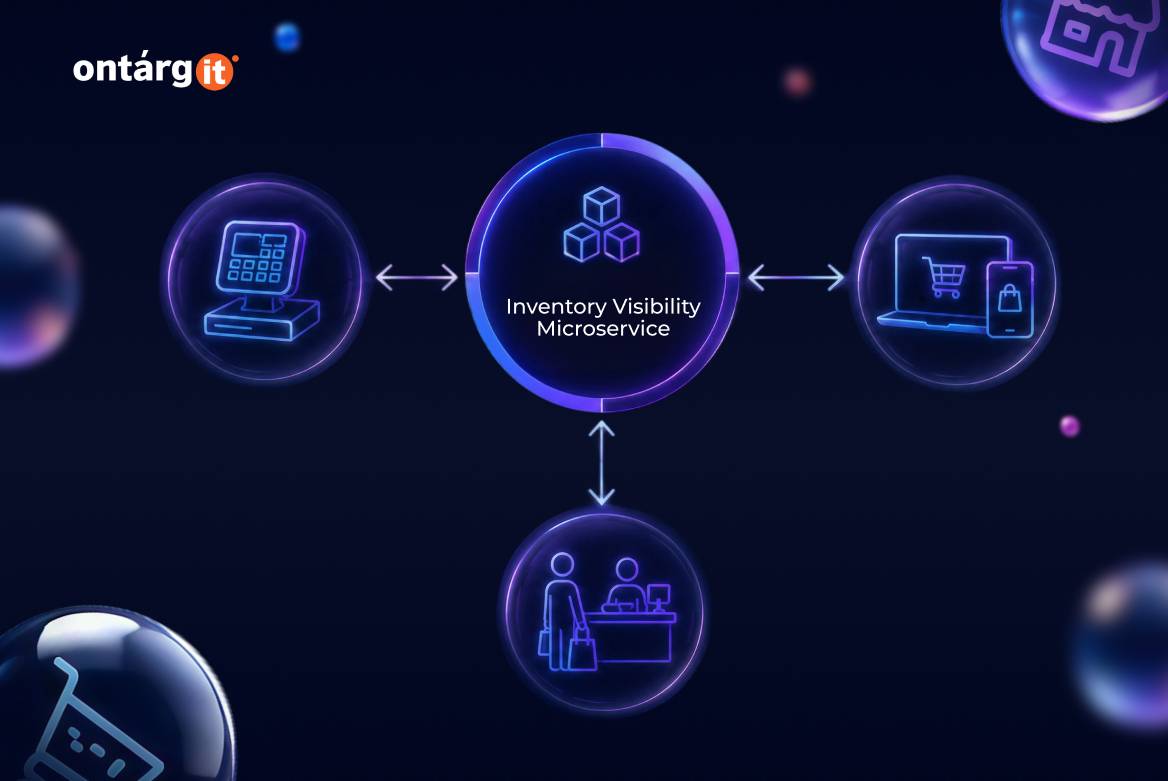
The Inventory Visibility add-in is a standalone microservice that maintains a single global inventory position via REST APIs and updates it in near real time outside the planning batch cycle.
For omnichannel retailers, the integration with Dynamics 365 Commerce Scale Units is the key connection. When a POS terminal or e-commerce session queries stock, it draws from the Inventory Visibility service — not from an asynchronous back-end snapshot. Soft reservations ensure that the same item cannot be reserved at the counter and purchased online simultaneously. The ATP (available-to-promise) feature extends this by calculating when a specific quantity will be available based on confirmed inbound supply — the figure that underpins an accurate store pickup date or delivery window.
Conclusion
Demand planning in Dynamics 365 Supply Chain Management is not a feature you switch on — it’s a layered configuration built on decisions that category managers, supply planners, and IT architects make together. Get the forecast profiles and coverage groups right, and the system generates replenishment logic that reflects how the business actually operates. Skip the stakeholder involvement, and the output is technically correct but operationally useless.