
An importer’s margin report shows one figure per model. The finance team knows that figure hides a spread: the car that waited three weeks in the port yard, the one that needed a new bumper before handover, the one that came in on a more expensive voyage. Each of those vehicles earned a different margin, and an average shows none of the differences.
Below, we follow one vehicle from arrival to after-sales and show how to set up Dynamics 365 so each VIN carries its own P&L — and which part of that setup has to be decided before go-live.
Where per-vehicle margin goes missing
Most importers can report margin by brand and model. Fewer can say what a single vehicle earned. Two cars of the same version arrive on different vessels, carry different freight and duty charges, wait a different number of days for a buyer, and one needs a repair before handover — yet a model-level average gives them the same cost.
VIN costing treats each vehicle identification number as the unit of cost and profit. In an automotive ERP, that means every cost event between the port and the final sale posts against the VIN. The sections below follow one vehicle through four stages and show what Microsoft Dynamics 365 Finance and Microsoft Dynamics 365 Supply Chain Management need to capture at each one.
Arrival: landed cost lands on the VIN
The first cost layer arrives before the car does. The Landed cost module in Supply Chain Management groups purchase orders into voyages and containers, then apportions duty, freight, insurance, and other cost types to the item line by quantity, volume, weight, amount, or a volumetric divisor. Estimated costs post with the purchase invoice, and when the actual freight and duty invoices arrive, the actual landed cost replaces the estimate.
For that cost to reach a single vehicle, the vehicle has to exist as its own costing unit. Serial numbers are inventory dimensions assigned to individual units, and when the serial number is enabled for financial inventory, cost is calculated per unit rather than averaged across the model. With the VIN as the serial number, each car carries its own inventory value from receipt.
OntargIT IDMS, built on Dynamics 365 Finance and Supply Chain Management, adds the ledger view: it uses the VIN as a financial dimension and allocates delivery, duties, risks, insurance, quality control, and overhead costs by VIN.
Before the sale: PDI, damage, and holding time
Between the warehouse and the showroom, a vehicle keeps accumulating cost. It is transported to a dealer, prepared in a pre-delivery inspection (PDI), sometimes repaired after transport damage, and sometimes held for weeks. IDMS manages booking, delivery to the dealer, damage handling, and PDI, and records every status change for each vehicle.
In an automotive ERP, the costing question is separate from the process question. A PDI or a damage repair improves margin visibility only if its cost posts with the VIN. If it lands on a workshop or logistics cost center instead, it becomes overhead again — spread across vehicles that never needed it. Design teams should decide which pre-sale costs count as direct vehicle costs, then make sure transport, workshop, and purchasing documents carry the VIN on every line.
Sale and after-sales on the same VIN
The sale closes the first half of the vehicle P&L. When revenue and discounts post with the same VIN that already carries its landed cost and pre-sale costs, finance reads gross margin per vehicle from the ledger instead of rebuilding it in spreadsheets.
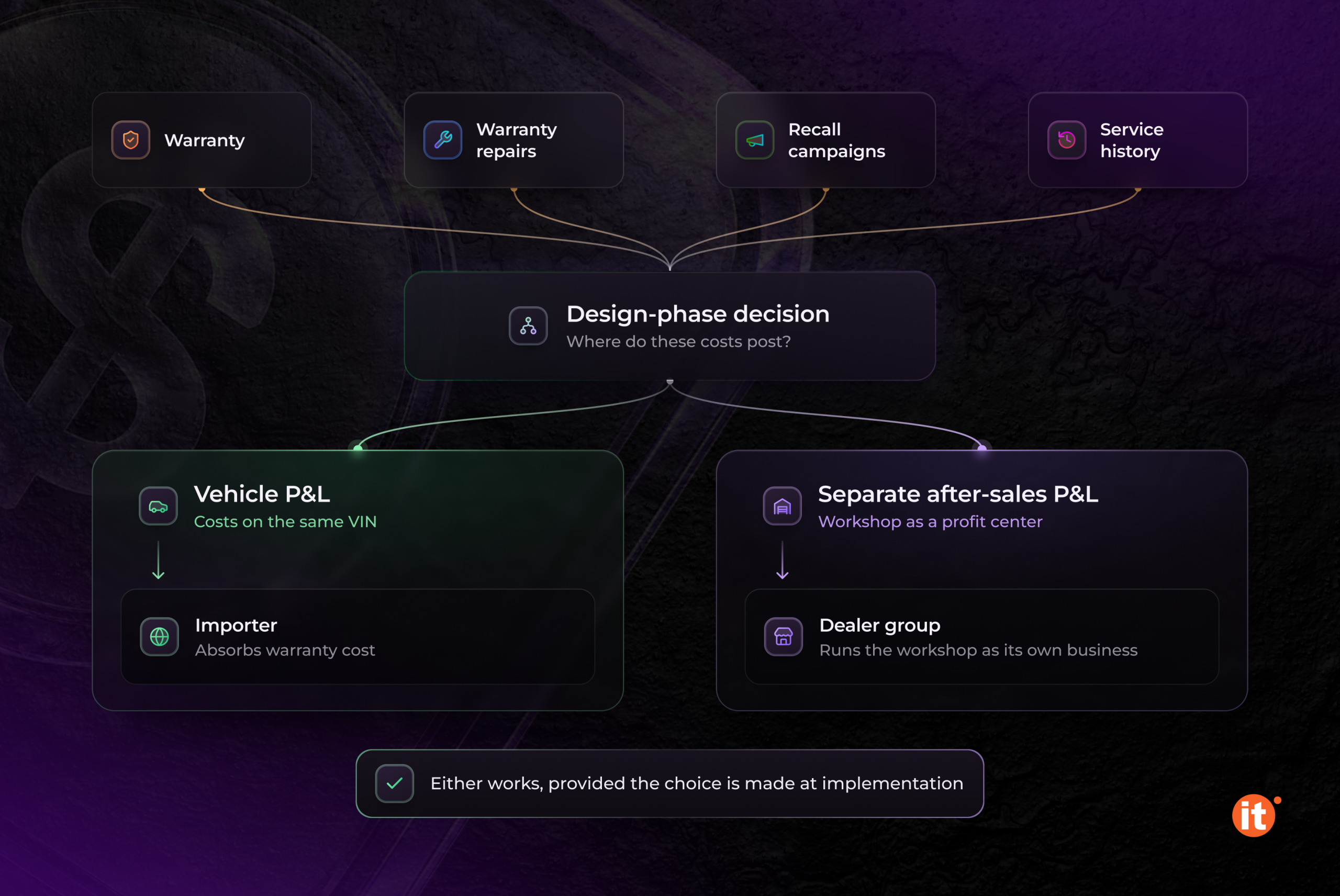
After the sale, the vehicle keeps generating transactions. IDMS tracks warranty, warranty repairs, recall campaigns, and service history per vehicle. Whether those costs belong in the vehicle P&L or in a separate after-sales P&L is a design choice: an importer that absorbs warranty cost wants to see it against the units that caused it, while a dealer group may run the workshop as its own profit center. Either works, provided the choice is made at implementation.
The implementation decision: dimension, tag, or tracking only
Dynamics 365 Finance and Supply Chain Management offer three ways to carry a VIN, and each produces different reporting. A financial dimension makes the VIN a segment of the ledger account, so finance can generate a profit and loss statement or a trial balance by VIN.
Financial tags are the lighter option — up to 20 user-defined fields per legal entity, stored on accounting entries without changing the account structure. For a per-vehicle P&L, the catch is reporting: tags aren’t available in Financial reporting, so there is no summarized balance per VIN; analysts export detailed transactions to Excel or Power BI and aggregate them there.
Serial number tracking alone gives each vehicle its own inventory cost. It answers “what did this car cost to land?” but not “what did this car earn?”
For VIN costing, the VIN has to be present on purchase, logistics, workshop, sales, and service documents from the first transaction. That puts it in the design phase: a report added after go-live can only show the transactions that were posted with a VIN.
OntargIT built IDMS on Dynamics 365 Finance and Supply Chain Management for vehicle importers, distributors, and dealers, with the VIN as a financial dimension and cost allocation by VIN. IDMS clients include Winner Imports, the importer of Ford, Volvo, Jaguar, Land Rover, Porsche, and Bentley in Ukraine, and MAN Truck & Bus Ukraine.
Conclusion
A per-vehicle P&L is set at implementation, by where the VIN lives in Dynamics 365. Carried as a financial dimension on every purchase, logistics, workshop, sales, and service document, it gives finance a margin per car straight from the ledger. Carried only as a tag, or added after go-live, it leaves analysts aggregating exports. Before an automotive ERP rollout, map each cost event in the vehicle lifecycle to the VIN.