
An agent that reconciles your general ledger reads your posting profiles exactly as they are. If those profiles differ across legal entities, it raises the differences as exceptions every period. Microsoft now ships three Dynamics 365 agents inside the finance and operations environment: one reconciles the ledger, one handles supplier email about purchase orders, and one turns receipts into expense reports. Each is a production-ready preview, and each inherits the versions, identities, setup data, and governance it finds. The five checks below show finance and IT leaders whether an environment is ready before any agent is enabled—so the pilot tests the agent, not the configuration.
What the three agents do and where each one lives
Microsoft now ships three Dynamics 365 agents that run inside the finance and operations environment rather than beside it.
The Account Reconciliation Agent works in Microsoft Dynamics 365 Finance. It reconciles the general ledger with the accounts payable, accounts receivable, tax, and bank subledgers, then recommends an action for each exception. A finance user accepts the recommendation or selects another action.
The Procurement Agent sits in Microsoft Dynamics 365 Supply Chain Management and combines supplier communications with impact analysis of purchase order changes.
The Expense Agent turns receipts into expense lines and expense reports, which employees review in Microsoft Teams. Microsoft documents it for Project Operations Integrated with ERP deployments.
All three are production-ready previews. The Time Entry Agent, configured in Dynamics 365 Project Operations, sits outside the scope of this check.
Check 1: Versions, packages, and activation
The Account Reconciliation Agent requires Dynamics 365 Finance version 10.0.46 or later, the Immersive Home and Agent management features turned on in Feature management, and current versions of two Copilot packages in the Power Platform admin center. The Expense Agent needs at least version 10.0.45, 10.0.46, or 10.0.47 at a specified minimum build, plus the Copilot for finance and operations apps package.
One step sits outside your control. Microsoft is reworking the Account Reconciliation Agent to give customers more configuration flexibility and predictable credit consumption, and until that release, Microsoft’s own team activates the agent on request. If your environment is two updates behind, or you plan to enable Dynamics 365 agents in the same quarter as a year-end close, build both facts into the timeline.
Check 2: Agent identity and security roles
Each agent runs under its own identity, not an employee’s account.
For the Account Reconciliation Agent, Microsoft recommends a dedicated agent user in both Dataverse and Finance, with named security roles on each side. The Expense Agent setup goes further: a Microsoft Entra ID user with licences covering Teams, Outlook, and Power Apps Premium, specific roles in Dataverse and in finance and operations apps, and the Mail.Read.Shared permission so it can read a shared mailbox.
These agents also depend on Microsoft Copilot Studio agents that publish automatically—but data loss prevention (DLP) policies in your Power Platform environment can block that publishing. Agent readiness therefore starts with your security and Power Platform owners agreeing who owns these identities and which policies apply to them.
Check 3: The setup data the agents read
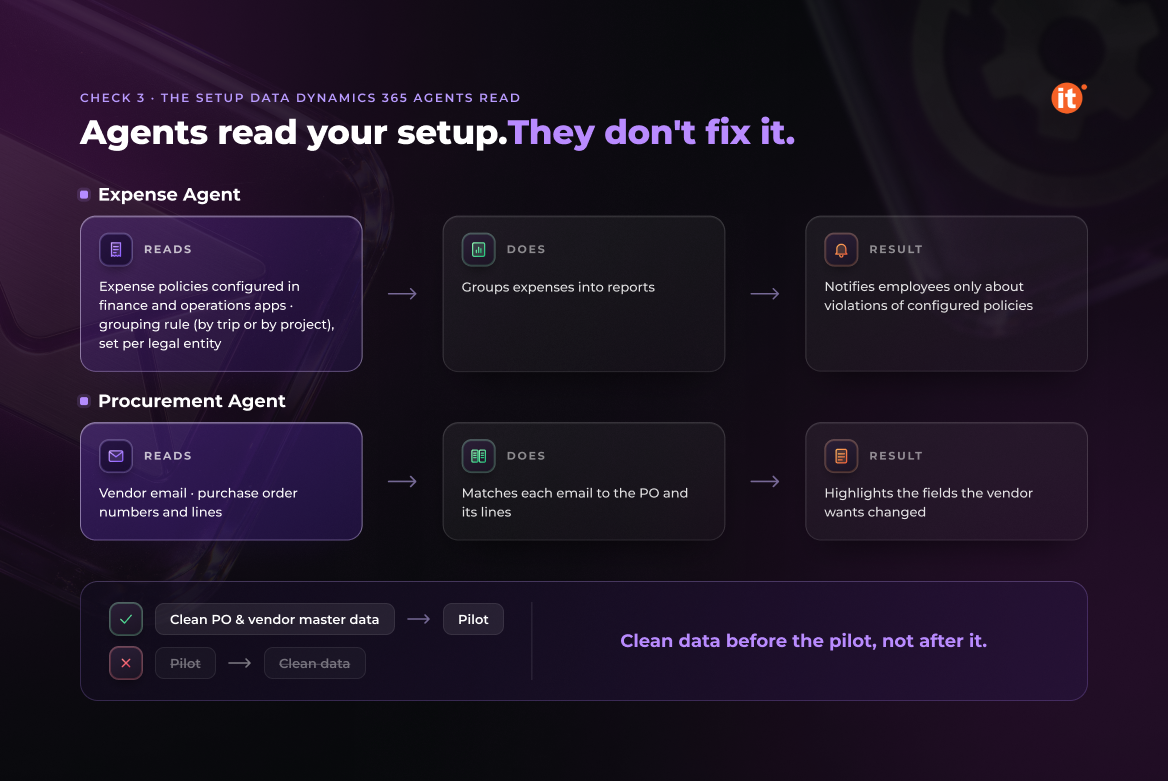
Agents read your configuration. They do not correct it.
The Account Reconciliation Agent builds its account list from the existing posting profile setup and from the bank and tax account setup in each legal entity. If posting profiles differ across legal entities for historical reasons, the agent inherits that inconsistency and raises it as exceptions.
The same logic applies elsewhere. The Expense Agent notifies employees only about violations of policies configured in finance and operations apps, and it groups expenses into reports by trip or by project—a choice set per legal entity. The Procurement Agent matches each vendor email to purchase order numbers and lines, then highlights the fields the vendor wants changed. Clean purchase order and vendor master data before the pilot, not after it.
Check 4: Mailboxes and human review points
The Expense Agent scans a configured folder in a shared mailbox every hour and stores the attachments as unattached receipts in Dynamics 365 Finance. An Exchange administrator creates that mailbox; someone in finance needs to own it.
The Procurement Agent’s supplier communications can send follow-up emails to vendors automatically, or save them as drafts that a buyer reviews before sending. Make that choice before go-live. Some vendor requests stay manual by design: the agent does not yet support splitting a purchase order line into multiple deliveries or changing the vendor on a purchase order.
The Account Reconciliation Agent recommends; a finance user applies, and any reconciled action can be undone. Treat autonomy levels as part of agent readiness—an approval matrix agreed with process owners, not a feature toggle.
Check 5: Credits, limits, and language
The Procurement Agent is billed in Copilot Studio credits, with a fixed cost per run plus a variable cost. For supplier communications, that variable cost depends on how many emails the agent reads or writes and how many attachments they carry.
For the Account Reconciliation Agent, administrators set daily or monthly exception limits and can enable alerts when usage reaches 50%, 75%, or 90% of the limit. Agree those limits with the financial controller, not only with IT.
Language is the check most teams miss. The agent’s suggested-action summary appears only when the user language is set to EN-US; users working in another language see the recommended action without the summary. Ukrainian-language finance teams should plan training around it. Production-ready previews are subject to supplemental terms of use, so review agent settings after each Microsoft update.
OntargIT is the official developer of the Ukrainian localization for Dynamics 365 Finance and Operations under a Localization and Translation Agreement with Microsoft, and it prepares environments where the localization layer and Microsoft’s agent layer have to work together. A Microsoft Solutions Partner – AI Business Solutions since 2009, with 150+ projects for 140+ clients in 24 countries, OntargIT also delivers Microsoft’s Agent in a Day workshop as a Qualified Delivery Partner.
Conclusion
Dynamics 365 agents remove manual work only where the setup underneath them is ready. Run the five checks—versions, identity, setup data, review points, and credits—per legal entity before you enable an agent, and pilot where posting profiles and policies are already clean. That order keeps agent readiness a planned workstream rather than a post-go-live fix.