

Every country added to a group ERP brings its own tax rules, tax invoices, bank formats, and statutory reports. The group, meanwhile, needs one chart of accounts and one set of numbers it can consolidate. A multi-country ERP rollout succeeds or stalls on where the line between those two demands is drawn. Draw it in the right place, and each new country is a configuration exercise. Draw it in the wrong place, and every country reopens the core. Below is how Dynamics 365 Finance separates the global template from the country layer, what belongs on each side, and how a partner-built Ukrainian layer fits into that structure.
Why the template decision comes before the first go-live
A multi-country ERP rollout repeats every design decision once per country, so a shortcut taken for the first legal entity is paid for again by every entity that follows. Gartner predicts that by 2027, more than 70% of recently implemented ERP initiatives will fail to fully meet their original business case goals (Gartner, What IT Leaders Must Do to Avoid Disappointing ERP Initiatives, 2024). One cause it names is scope customized around near-term requirements, which stops fitting once business goals change. In a group rollout, every country exception written into the core becomes that kind of customization.
Microsoft’s Solution Blueprint Review, the starting point of its Success by Design framework, covers template strategy and the rollout model before main implementation work begins. For a group moving to Microsoft Dynamics 365 Finance, the line between global and local has to be drawn while the design is still on paper. Redrawing it after three countries are live means changing a system that three finance teams already rely on.
What belongs in the global template
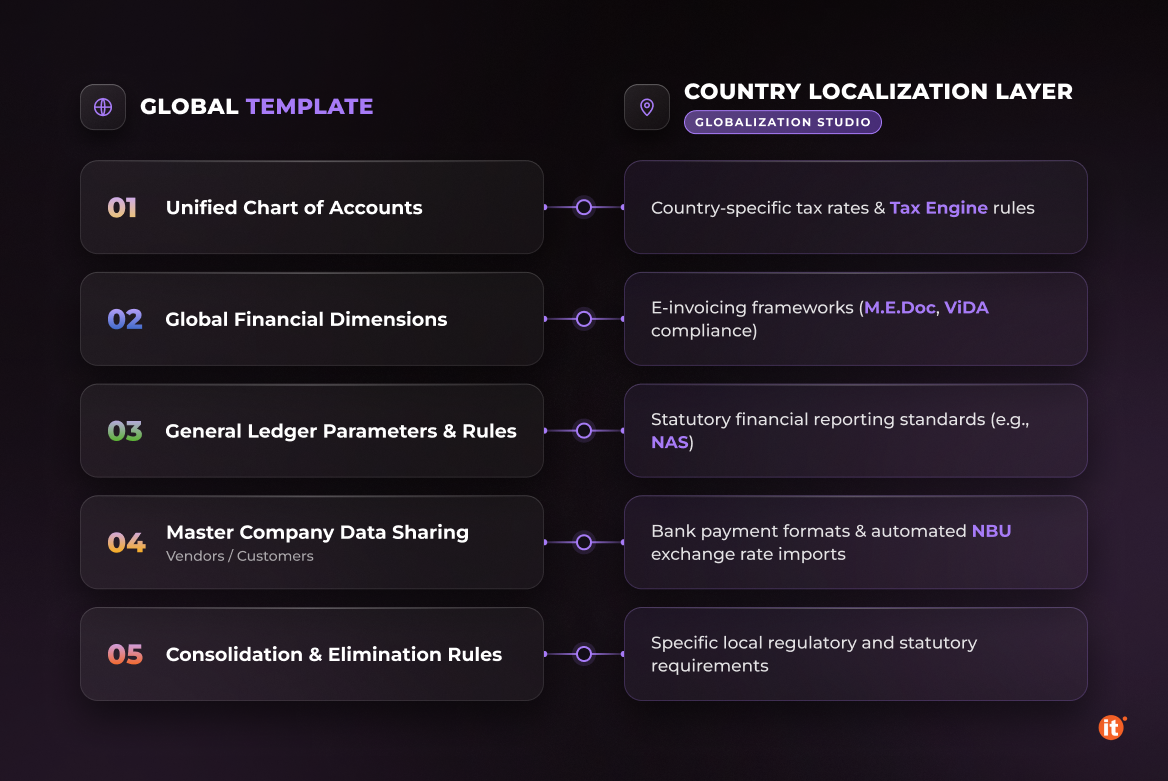
The global template holds the structures that every downstream process reads. In Dynamics 365 Finance, the chart of accounts, financial dimensions, and many General ledger parameters feed later processes, so groups standardize them first. When a dimension means the same thing in every subsidiary, group reporting needs no mapping tables.
Cross-company data sharing lets a group maintain master, reference, and setup data once and share it across legal entities in the same deployment. Master company data sharing, generally available since version 10.0.43, lets child companies work from a single record owned by a master company. For the global template, that means one owner for every value several finance teams would otherwise maintain separately.
Group reporting is a template decision as well. Dynamics 365 Finance can consolidate through a dedicated consolidation legal entity, or Financial reporting can combine companies when a report is generated. Which option the group picks determines how intercompany accounts and elimination rules are set up in every country.
What belongs in the country layer
Dynamics 365 Finance activates country-specific functionality per legal entity, based on the country or region in its primary address. That is the mechanism behind ERP localization in a group: tax determination, electronic invoicing, statutory reports, and bank formats sit in the country layer, configured through Globalization Studio rather than coded into the global template. Globalization Studio combines Electronic Reporting, Tax Calculation, and Electronic Invoicing with localization content that Microsoft monitors, updates, and lets partners extend.
The EU’s VAT in the Digital Age package, adopted in March 2025, introduces digital reporting requirements for cross-border B2B transactions from 1 July 2030 (European Commission, VAT in the Digital Age (ViDA), 2025). A group that holds e-invoicing and reporting in configuration updates the affected country layers; a group that coded them into the core reopens its template for every country.
The partner layer: Ukraine as an example
A group with a Ukrainian subsidiary needs a partner-built localization layer. OntargIT develops that layer for Dynamics 365 Finance under a Localization and Translation Agreement with Microsoft. It sits in a four-level stack: Dynamics 365 base functionality, Microsoft’s localization package for Eastern Europe, OntargIT’s package for Ukraine, and customer-specific customization. The Ukrainian package covers NBU exchange-rate import, tax invoice exchange with M.E.Doc, client-bank interfaces, and financial reporting under national standards.
Mayr-Melnhof Karton, one of the world’s largest cartonboard producers, keeps full Ukrainian accounting and tax records and corporate international reporting in one system; in a second project, OntargIT delivered financial management with an Iranian localization. Scatec Solar, the Norwegian renewable-energy company, runs Dynamics 365 Finance and Microsoft Dynamics 365 Supply Chain Management with the Ukrainian localization, including energy-market transactions. ERP localization built as a layer changes with local law, while the template changes only when the group decides.
Sequencing the rollout without reworking the template
A pilot country tests the global template against real transactions before other countries depend on it. OntargIT delivers localization in four phases—analysis and prototype, development, implementation, and operation—and the first phase includes a GAP analysis of local operations against the template. Each gap gets one of two answers: a configuration in the country layer, or a change to the global template that every country adopts.
Conclusion
Draw the line between the global template and the country layer before the first go-live, and each later country becomes a configuration project. Groups that already run Dynamics 365 Finance in one country can test their current setup against that line: list every country-specific change in the core and ask whether it could live in configuration instead.