
Most agri-sector planning failures are not caused by poor decisions. They are caused by the moment between when reality changes and when the plan reflects it — a harvest comes below forecast, a supplier pushes delivery by three weeks, a production line needs to switch a formula mid-season. In a spreadsheet environment, that gap is measured in hours of manual reconciliation. In an integrated Agri ERP, it is measured in minutes.
The Excel Problem Is Not About Skill — It’s About Structure
The problem is that Excel was designed to hold data, not to connect it — and agri-sector planning depends entirely on connections: between harvest calendars and raw material orders, between production schedules and perishable stock, between supplier contracts and cash flow forecasts.
When those connections live in separate files, owned by separate people, updated on separate rhythms, the plan is always slightly behind reality. A harvest window shifts by two weeks — purchasing finds out when the supplier calls. A production order changes volume — finance sees the cost impact at month-end. The gap between what was planned and what actually happened is managed by email threads and manual reconciliation, not by the system.
Planning Optimization: MRP That Runs While the Team Works
Master planning in Dynamics 365 Supply Chain Management is handled by the Planning Optimization Add-in — an external service that performs MRP calculations outside D365 SCM and its SQL database. The practical consequence for agri operations is significant: planning runs complete fast enough to execute during office hours, which means planners can respond to demand or supply changes and see updated planned orders within the same working day, rather than waiting for an overnight batch window.
Two run types serve different planning rhythms. A full regenerative run recalculates all requirements across the entire plan — the right choice at the start of a season, after a significant contract revision, or when forecast assumptions shift substantially. A net change run processes only items where demand or supply has changed since the last planning execution, completing in minutes — the right choice for intraday updates when a single supplier confirms a delivery date or a production order changes quantity.
For seasonal agri operations, this combination matters: a full regenerative run anchors the seasonal plan, and net-change runs keep it current throughout the harvest and processing cycle, without requiring planners to wait for a nightly recalculation before acting.
Two Forecasts, One Plan: Demand and Supply Logic for Raw Materials
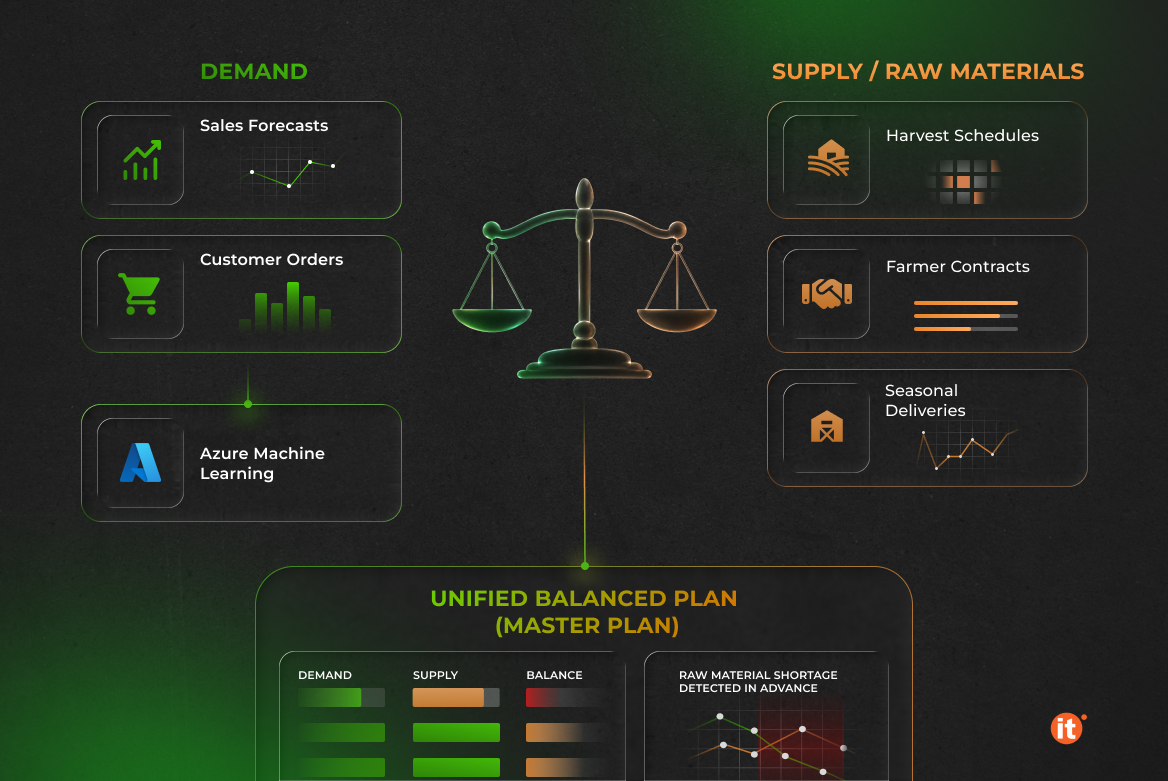
Most ERP planning discussions focus on the demand side: what customers will order drives what the system plans to produce and procure. Agri-sector operations add a supply-side variable that changes the planning equation — the availability of raw materials is uncertain. Harvest volumes, cooperative delivery schedules, and agricultural commodity contracts introduce supply variability that demand-only MRP cannot resolve.
Dynamics 365 Supply Chain Management handles this through two distinct forecast types that can run inside a single master plan.
The demand forecast generates a statistical baseline using Azure Machine Learning on historical transaction data, then refines it as actual sales orders arrive, using reduction keys configured by the planner for each item group. The supply forecast works differently: planners enter anticipated raw material receipts as supply forecast lines, and the system generates planned purchase orders from those lines while incorporating them into the overall material requirements calculation.
Planning Optimization reconciles both into a single, coherent plan, identifying gaps where anticipated supply falls short of production requirements before they lead to production stoppages.
Coverage Groups — Where Agri Seasonality Gets Its Own Logic
Not all raw materials in an agri operation behave the same way, and master planning should not treat them as if they do. Coverage groups in Dynamics 365 Supply Chain Management define the replenishment logic for each item or item group, and choosing the right lot-sizing method for each material category is where seasonal agri planning either succeeds or fails.
Bulk commodity raw materials purchased under a seasonal contract call for the Period lot-sizing method: the system consolidates all demand within a defined period into a single planned purchase order, matching how buyers actually negotiate seasonal volumes. Perishable inputs with short shelf lives — fresh produce, liquid dairy, temperature-sensitive ingredients — work better under Requirement, where the system creates one planned order per production requirement, minimizing time between receipt and consumption.
Safety stock between harvest seasons is set under Min/Max, with replenishment triggered when projected on-hand inventory falls below a defined threshold. A forecast reduction key is attached to each coverage group, progressively replacing the statistical forecast with confirmed orders as the selling period advances — so the system does not double-count both the forecast and the actual demand when both exist within the same planning horizon.
FEFO and Variable Weight — The Two Planning Rules Excel Cannot Enforce
Two inventory rules define operational quality in agri and food processing. Both exist in Excel as policies someone is supposed to follow. Neither can be automatically enforced there.
First-Expiry, First-Out — FEFO — governs which batch of raw material gets consumed first. In a spreadsheet environment, the warehouse manager applies this rule manually, and the planning system has no visibility into which specific batches are reserved against which production orders. Dynamics 365 Supply Chain Management enforces FEFO at the planning and execution level: the system selects inventory batches by expiry date when reserving stock against production orders, and planned orders account for batch shelf-life constraints rather than treating all on-hand inventory as interchangeable.
Variable weight management addresses a different structural problem in meat, fish, poultry, and dairy operations: the unit used for physical handling — a box, a carcass, a pallet — does not weigh the same every time. D365 SCM handles this through two distinct units of measure per product. The inventory unit (kilograms, pounds) is the unit in which the product is weighed and invoiced. The catch-weight unit (box, each, pallet) is the unit in which warehouse transactions are performed — receiving, picking, transferring, and shipping. The system tracks both simultaneously: a warehouse worker receives and ships in catch-weight units, while the costs and invoices are in inventory units based on actual weighed quantities.
From Forecast to Financial Plan
The final gap that spreadsheet planning cannot close is between the operational and financial plans. In most agri companies that run on Excel, the production and finance teams work from different documents, with synchronization done manually on a weekly or monthly cadence. Planned purchase orders exist in a procurement file. Their cost impact is reflected in the cash flow forecast when the finance model is updated.
In Dynamics 365 Supply Chain Management, planned purchase orders and planned production orders generated by Planning Optimization are immediately visible to the financial layer — cash flow projections update as the plan changes, not after someone transfers data between files. The next-generation Demand planning app in D365 SCM adds a collaborative dimension to this: planners can run what-if scenarios, incorporate external signals such as weather forecasts or promotional calendars, and share forecast versions with commercial, procurement, and production teams through Microsoft Teams — reaching consensus on a single number before the plan is committed.
Conclusion
Excel is not the problem — the absence of a connected system is. When purchasing, production, finance, and raw material availability live in separate files, every planning decision carries a hidden reconciliation cost. Dynamics 365 Supply Chain Management eliminates that cost by treating agri-sector complexity — seasonality, variable supply, perishable inventory, variable weight — as configuration, not workaround.