
A cost actual with a rate of zero posts without error. It reaches project actuals and the ledger, contributes nothing to cost, and leaves the engagement looking more profitable than it was. That behaviour is documented, not a defect — it is what happens when a price list can’t resolve a rate.
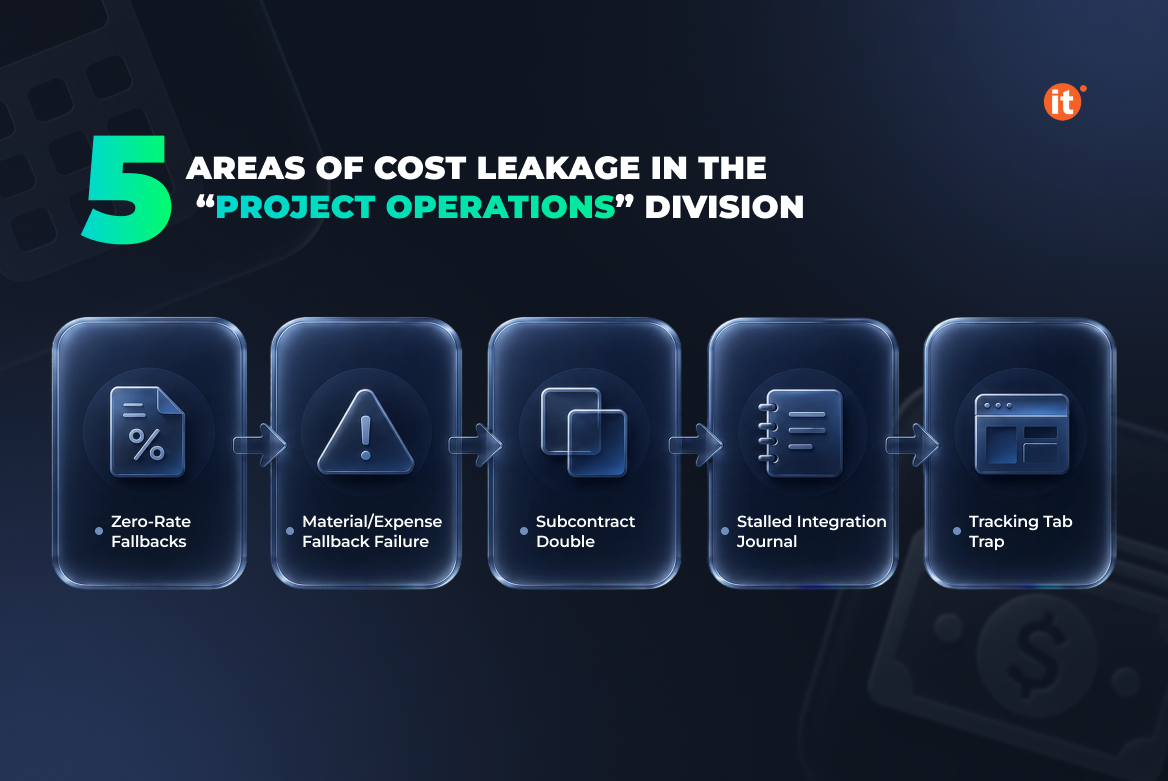
It is also one of five boundaries where the cost picture in Dynamics 365 Project Operations depends on configuration rather than on what teams actually spent. This article maps each boundary — pricing fallbacks, subcontract reversals, the handoff into Finance — and names the specific check that closes it, so project cost tracking reports the full number.
Which cost channels your deployment actually has
Dynamics 365 Project Operations ships in three deployment types: Project Operations Core, Project Operations Integrated with ERP, and Project Operations for manufacturing. Anyone who implemented before the rename will know these as lite, resource/non-stocked, and stocked/production order. The choice is usually made on licensing and scope grounds — and it fixes the cost perimeter before anyone opens a price list.
Integrated with ERP carries the widest set of channels: full expense with receipt OCR, customer-facing invoicing, and revenue recognition for projects. Core carries basic expense only, meaning simple expenses recorded against a project and approved by the project approver, and it has no revenue recognition. Two channels are absent by definition rather than by misconfiguration. Everything below assumes Integrated with ERP and flags Core where the boundary differs.
The cost that posts at zero
Every actual needs a cost rate, and the system resolves one from a cost price list selected by the transaction date and currency. For time, it matches Role, Resourcing Company and Resourcing Unit against the role price lines. When that combination finds nothing, it drops the lowest-priority dimension and searches again, repeating until a row matches. Only when no role price row is found at all does the rate default to zero.
Expense and material get no such tolerance. One failed match on Category and Unit, or on Product and Unit, and the rate is zero — there is no progressive fallback. Material fails the same way when the matched price line uses a pricing method other than Currency amount, because Dynamics 365 Project Operations supports only Currency amount for materials consumed on a project.
A zero-rate actual still posts. Nothing blocks it and nothing flags it; the project simply carries less cost than it incurred. This is the most common reason project cost tracking quietly understates spend.
Subcontractor cost lands twice
When subcontractors report time, expense or material usage, approval creates cost actuals priced from the project price list. That figure is your expectation of what the vendor will charge, not what the vendor charged.
Confirming the vendor invoice replaces it. The system reverses the previously recorded cost actuals and creates new ones from the vendor invoice lines, so project cost restates at the invoiced amount. Vendor invoicing is not a payables formality here — it is the event that finalizes subcontract cost, and any margin figure read before it is provisional.
Three conditions govern vendor invoicing in this flow. It requires enabling the subcontract actuals processing feature in Feature management. Cost actuals can only be matched to vendor invoice lines that reference a subcontract line; verification status is still tracked on lines that don’t, but actuals cannot be linked to them. And Fixed Price subcontracts are not supported for resource/non-stocked scenarios, which rules out milestone-based vendor billing on that deployment.
Where actuals stall between Dataverse and Finance
Project actuals in Dataverse are not yet accounting entries. The periodic Import from staging table process finds actuals that have not reached the Project Operations integration journal and creates a journal line for each one. Someone then posts that journal. Until both steps complete, the cost exists operationally and is invisible in the ledger.
How coarse the ledger picture is depends on the Period unit parameter, which groups journal lines by day, by month, by year, or into a single journal for everything. A yearly grouping is a valid configuration and produces accounting that trails the project by months.
The failure worth designing around is the exchange rate. If exchange rate setup is missing, the import process does not add the record to a journal — it writes an error to the job execution log instead. No user is notified. The cost simply never arrives.
What to monitor, and who owns it
Project Operations includes an integration workspace built for this problem. The Missing actuals view shows expenses processed in Finance that lack reference records from Dataverse; the Missing journal lines view shows expenses and vendor invoices that synced successfully but have no integration journal line created or posted. Both belong on a scheduled check with a named owner, not on a quarterly investigation.
One reporting caveat deserves more attention than it usually gets. The Tracking tab on a project shows labor costs only — material and expense costs are excluded from what appears there. Reading it as a project cost total will understate spend, and a Power BI model should draw on project actuals directly rather than reproduce that view.
Reliable project cost tracking sits with IT here, because every failure above is a configuration or synchronization condition rather than an accounting error.
OntargIT delivered Dynamics 365 Finance with Project Operations for Encore Business Solutions in Canada, covering project accounting, resource management and project management. For Room 8 Group, a game-development outsourcing company, OntargIT automated project accounting and project invoicing and integrated Jira with Dynamics 365 so delivery data reaches the financial record. OntargIT has been a Microsoft Solutions Partner for Business Applications since 2009, with 150+ projects delivered.
Conclusion
Reported project cost is a configuration outcome. Every failure above — a zero rate, a reversed subcontract actual, an unposted integration journal — produces a number that looks valid and understates spend. Start with two checks: run the cost price lists against the roles, categories and products actually in use, and open the integration workspace views to see what never reached Finance. If both come back clean, the margin figure can be trusted.