

In 2025, 78% of EU internet users bought something online (Eurostat, E-commerce statistics for individuals, 2025). For a retailer with stores and a website, that means two channels selling the same shelf. When each channel works from its own stock figure, the last unit gets sold twice—and one customer learns about it from a cancellation email. The fix is a single stock number that every channel quotes, reserves, and promises from. Here is how Microsoft Dynamics 365 delivers that number, and which implementation decisions determine whether it stays accurate.
Why your stores and your website disagree on stock
Ask a store manager and the e-commerce lead how many units of a bestseller are left, and the two answers rarely match. Microsoft is open about the reason. In standard Microsoft Dynamics 365 Commerce, the availability that POS, the e-commerce APIs, and headquarters show during the trading day is an estimate, not a guaranteed real-time figure. The channel-side calculation starts from the last stock level headquarters knows about, then adds store sales, customer orders, returns, and store shipments that haven’t synced yet. That works until two channels sell the same last unit within the same hour. The cost then shows up twice: as canceled orders, and as stock held back from the website “just in case.” Omnichannel inventory that is nearly right is the source of both.
Inventory Visibility: a shared stock ledger for every channel
The Inventory Visibility Add-in for Microsoft Dynamics 365 Supply Chain Management is built for this gap. It runs as a separate microservice on Microsoft Dataverse and records on-hand changes in real time from every data source and channel—including systems outside Dynamics 365. Companies with a Supply Chain Management license get it at no extra cost, within Microsoft Power Platform storage and API limits.
Retailers licensed for both products can make Inventory Visibility the inventory provider for Dynamics 365 Commerce. The Store Commerce app, the e-commerce site, and headless commerce APIs then all query the same live figure. Stock is reserved when a customer order is created, edited, or canceled, and adjusted during fulfillment and returns. When those orders later sync to Supply Chain Management, an automatic offset removes quantities that were already posted, so nothing is counted twice. That is what real-time inventory visibility means in practice for retail on Dynamics 365: one ledger that every channel reads from and writes to.
Soft reservations: who gets the last unit
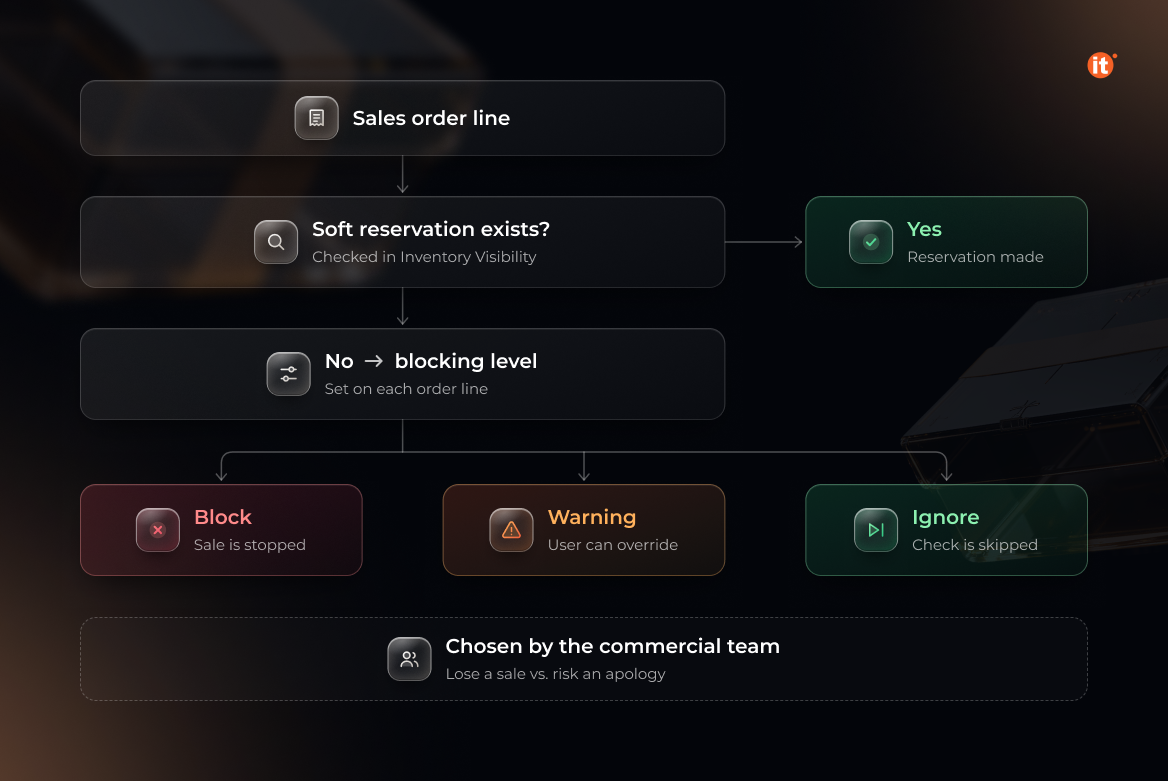
Soft reservations settle the race for the last item. Microsoft designed them for organizations where two or more systems take orders and double-booking has to be ruled out. In Microsoft’s own example, Supply Chain Management still shows stock that Inventory Visibility has already promised to web orders not yet synced. When the call center then tries to reserve against it, the request fails—Inventory Visibility checks against what is actually left.
In Supply Chain Management, each sales order line also carries a blocking level—Block, Warning, or Ignore—that decides what happens when no soft reservation exists. Block makes the rule absolute; Warning lets a user override it. That choice belongs to the commercial team, because it decides whether the business would rather lose a sale or risk an apology.
Allocation and available to promise: deciding before demand arrives
Reservations handle orders that already exist. Inventory allocation handles scarce stock before any order arrives. Planners can ring-fence quantities for the web channel, specific regions, or key customer groups, and Inventory Visibility protects that stock from other allocations, reservations, and sales demand. Microsoft recommends allocating first and then soft-reserving against the allocation, so each channel’s consumption is tracked against its quota in near real time. Allocation groups can nest up to eight levels deep—channel, then region, then customer group, for example.
Available to promise extends the same logic into the coming days. Teams can define available to promise formulas that span every channel and data source, whether or not those sources belong to Dynamics 365. For click-and-collect and home delivery, that is the difference between quoting a date and guessing one.
Four decisions to settle before go-live
Real-time inventory visibility comes from configuration choices, not from switching on an add-in. Four decisions shape the result:
- Define "available" per channel. Omnichannel inventory starts with agreeing which data sources and measures feed the figure the website sells from—and which feed the store's.
- Fix dimension levels early. Allocations for a product must always use the same dimension level, or the allocation data becomes inconsistent.
- Keep Supply Chain Management as the system of record. Inventory Visibility cannot change Supply Chain Management data; the flow from it is one-way, and integrations have to be designed around that.
- Review the soft reservation configuration in production, not only in the sandbox. Microsoft notes that the default configuration has changed across versions, so the two environments can start from different settings.
OntargIT implements Dynamics 365 for retailers that sell across stores and online, with a retail practice covering omnichannel commerce, real-time POS integration, and real-time inventory tracking. Retail clients include COMFY, with 82 stores in 40 Ukrainian cities; Eldorado, with 150+ stores and two online stores; and Chanel, where OntargIT delivered POS integration and WMS alongside Ukrainian localization.
Conclusion
Real-time stock is a design decision made during implementation, not a setting switched on after go-live. The add-in provides the shared ledger; your team decides what “available” means for each channel, who wins the last unit, and which stock is protected for whom. Before your next peak season, check how your current setup answers the four decisions above.