
- What Copilot actually does in Supply Chain Management today
- Demand planning: Copilot reads the plan, planners still set it
- The warehouse floor gets its own Copilot
- Where the autonomous agent fits
- A sequencing model for the next four quarters
- Conclusion
- FAQ
- Can Microsoft switch a Copilot feature on in our environment without our approval?
- We use EDI with our main suppliers. Does supplier communications still apply?
Microsoft’s event keynotes and its shipped feature list are not the same document. For Microsoft Dynamics 365 Supply Chain Management, the published Copilot inventory runs to three in-app experiences and one autonomous agent still in production-ready preview — a shorter list than most roadmap decks suggest, and a more useful one, because every item on it can be switched on this quarter.
What Copilot actually does in Supply Chain Management today
Microsoft’s consolidated capability list for Dynamics 365 Supply Chain Management names three Copilot experiences. AI summaries, demand plan analysis, and workload insights in the Warehouse Management mobile app — that is the published set, and anything past it comes from the shared finance and operations layer or from an agent your team builds.
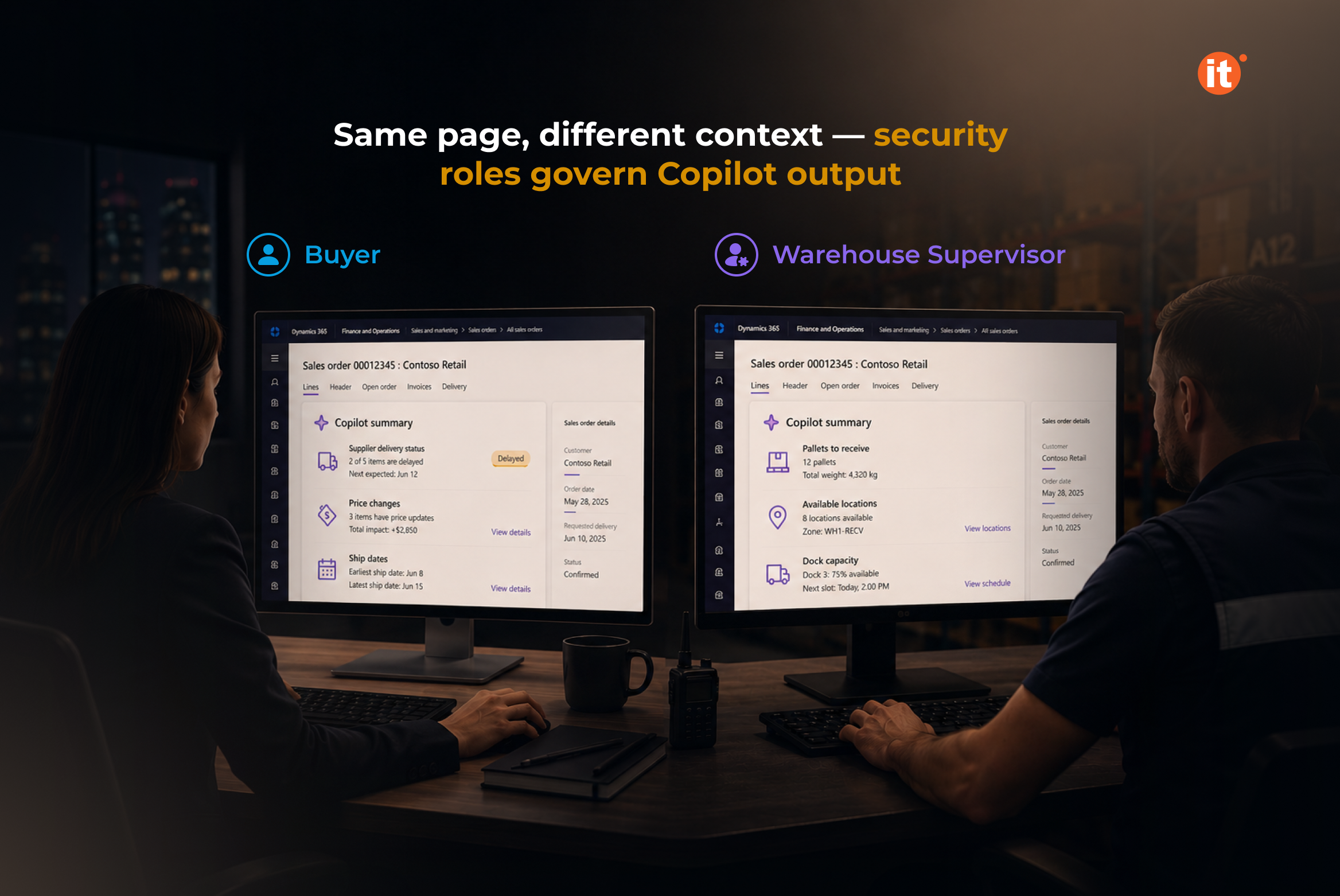
AI summaries appear on high-traffic pages and pull together context a user would otherwise assemble by hand: lines on a purchase order, items in a warehouse, overdue invoices for a vendor. Each summary is scoped to the security roles the signed-in user already holds. A buyer and a warehouse supervisor open the same page and read different summaries.
Two categories run through everything below. An in-app assistant reads, summarizes, and answers inside a session a person started. An autonomous agent acts on a schedule against rules configured in advance. Planning a supply chain Copilot rollout means treating those as separate projects carrying separate risk.
Demand planning: Copilot reads the plan, planners still set it
Demand planning in Dynamics 365 Supply Chain Management lets planners put questions to Copilot about a plan they have open. The analysis covers four things: shifts between two consecutive periods, trends across six, anomalies, and forecast accuracy. Questions come from a predefined set rather than a free-text box, and that constraint is the feature’s strongest property — every answer traces back to a question Microsoft defined and tested, which is what makes the output defensible in a planning review.
A planner selects a point on the chart, picks a question, and receives a natural-language summary with visualizations. What disappears is the assembly of the variance explanation. What remains is judging it.
The demand planning Copilot requires the generally available version of Demand planning and is switched on per environment. Organizations still running the older forecasting model get nothing here until they migrate, which turns the demand planning Copilot into an argument for that migration rather than a reason to postpone it.
The warehouse floor gets its own Copilot
Workload insights sits in the Warehouse Management mobile app rather than the web client, so it reaches people who never open the ERP. A worker signs in and lands on a workload page: unstarted picks and receipts for the current warehouse, how many mobile sessions are running alongside them, and a Copilot-generated summary of what is waiting.
Version requirements are specific. You need Supply Chain Management 10.0.39 or later and mobile app version 2.3.2.0 or later, with the context-aware worker summary feature enabled — on by default from 10.0.39. Workers control whether the page opens at sign-in and whether counts appear as work headers or work lines.
That second setting matters more than it sounds. Warehouses shipping few-line orders think in orders; warehouses with volatile quantities think in lines. Choose wrong and a useful summary becomes a number the floor stops trusting.
Where the autonomous agent fits
One autonomous agent is published for Dynamics 365 Supply Chain Management: the Procurement Agent, currently a production-ready preview. It carries two capability sets that can be enabled together or independently.
Supplier communications handles the email traffic around purchase orders. Inbound, it monitors vendor mail, separates confirmations from change requests, and identifies which fields a vendor wants changed — so a purchaser applies the change without first hunting for the order. Outbound, it drafts follow-ups asking why a delivery is late or reminding a vendor to confirm, then either sends them or holds them as drafts for human review.
Impact analysis answers the question that follows. When a vendor moves a date, it assesses the downstream effect on inventory, production schedules, and customer deliveries, then classifies the change as Has impact or No impact.
Budget for it correctly. The Procurement Agent bills against Copilot Studio credits — a fixed cost each time it runs, plus a variable cost driven by what it consumes.
A sequencing model for the next four quarters
The constraint on a supply chain Copilot rollout is rarely the feature list. Gartner surveyed 140 senior supply chain leaders in November 2025 and found 83% applying AI to specific use cases or gradually scaling it into integrated processes, against 17% pursuing immediate transformational redesign (Gartner, Gartner Survey Shows AI is Not Driving Supply Chain Operating Model Transformation, 2026). A workable order follows from that finding: enable the read-only features first, because AI summaries and workload insights change what people see without changing what the system does.
Demand plan analysis comes next, wherever Demand planning is already generally available. The Procurement Agent comes after — and it should run in draft-review mode well before anyone lets it send.
Before that step, the platform work has to be finished. Agent management, where agents are discovered, configured, and monitored, requires the Immersive Home feature, version 10.0.44 or later, a linked Dataverse environment, and a Copilot Studio billing plan with credits assigned. Agent activity lands in a Dataverse table retained for 90 days by default. Decide who reads that log, and whether 90 days satisfies your auditors, before an agent sends its first email.
OntargIT’s Dynamics 365 Supply Chain Management delivery includes logistics and distribution operators — Nova Poshta, which handles more than 212 million shipments a year across 6,000+ branches, took Supply Chain Management scope alongside the finance module and Ukrainian localization, and the distribution portfolio extends to Wavin Ukraine, HLC, and Avantor. As a Microsoft Solutions Partner for Business Applications since 2009 with 150+ delivered projects.
Conclusion
The gap between a Copilot demo and a Copilot deployment is a version number. Every capability described here carries a floor — 10.0.39 for warehouse workload insights, 10.0.44 and a linked Dataverse environment for agent management — and the read-only features are available to most organizations already running a current build. Check your environment against those prerequisites before scoping anything else. Book a free consultation and we will map your current version against the features you can enable this quarter.