
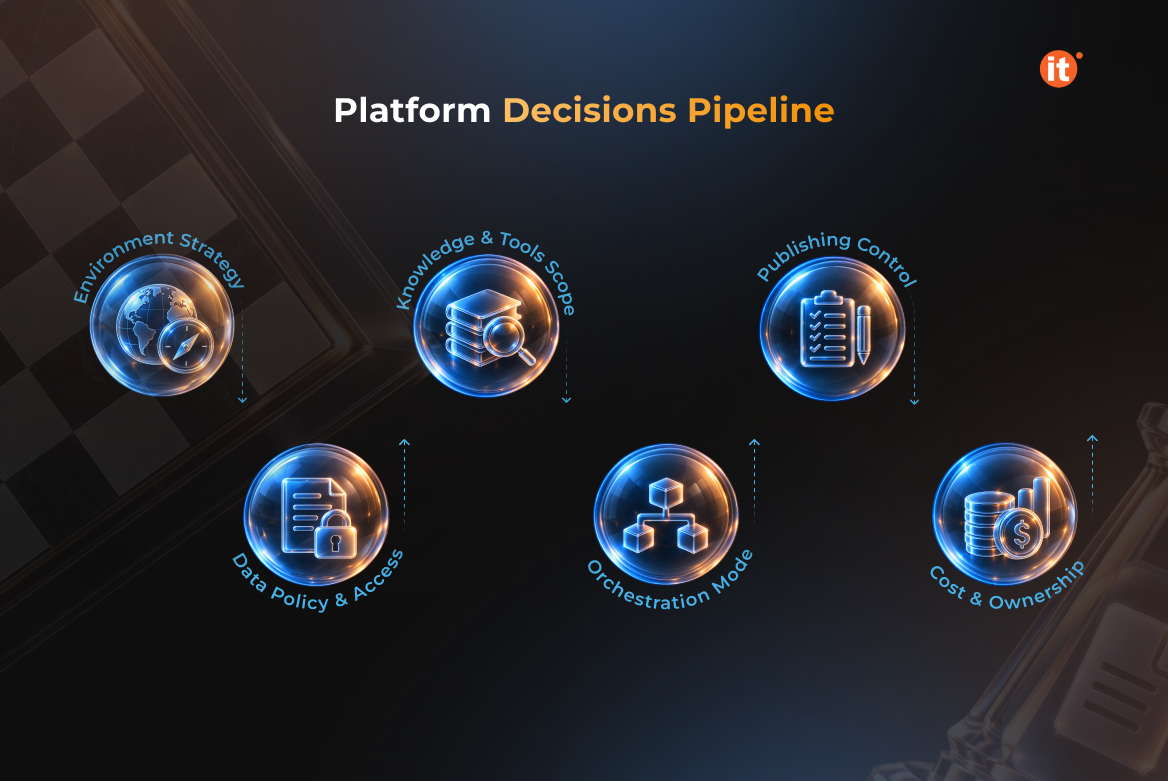
The first agent in most organizations gets built in a default environment, by whoever moved fastest, with whatever connectors happened to be available that afternoon. It works. Then a second team copies the pattern, a third copies the second, and the platform decisions nobody made deliberately become the ones everybody inherits. Microsoft Copilot Studio makes the build easy enough that building is rarely the hard part. Six platform choices sit underneath it, and an IT director meets them in a predictable order: environment, data policy, knowledge and tools, orchestration, publishing, and cost.
Pick the environment before you pick the use case
Every agent you build lives inside a Power Platform environment, and that environment decides far more than where the agent is stored. It sets the data boundary, the security roles that apply, the data policies in force, and whether development, test, and production are separated at all. Get that wrong once and every agent after it inherits the mistake.
Microsoft splits agent creation into three zones by risk and technical complexity: citizen development for personal productivity, partnered development for team and department agents built under IT review, and professional development for mission-critical work. A first departmental agent belongs in the partnered zone — an IT-managed environment, with an IT-managed review process. Managed environment features apply only to agents built in or deployed to a managed environment, so Copilot Studio governance starts at provisioning, not where it gets retrofitted.
Write the data policy before anyone opens the canva
A data policy allows or blocks unauthenticated usage, individual channels, individual knowledge sources, individual connectors, connections to skills, and Application Insights integration. You apply it to a single environment, an environment group, or the entire tenant, so writing one pays back across every agent that follows. Microsoft’s recommendation is graduated rather than uniform: strict in personal development environments, relaxed in dedicated test and production.
Authoring access is the second lever. AI agent governance holds only when the list of people who can build stays short and centrally managed: assign the Environment Maker role to those people, and grant it through Microsoft Entra ID groups rather than one user at a time. Block every connector the Power Platform environment does not need.
Knowledge is a read decision; tools are a write decision
Knowledge sources ground the agent in your content — SharePoint sites, uploaded files, public websites, Dataverse tables, Azure AI Search indexes, Dynamics 365, and other connected systems. The question for you is not which sources are available. It is whether each source's existing access model is one you already trust, because the agent inherits that model rather than improving it.
Tools are where an agent stops answering and starts acting. Copilot Studio supports connectors, agent flows, prompts, REST API endpoints, and Model Context Protocol servers as tools, and each one is a write path into a system your auditors ask about. Agent authentication — set to none, authenticate with Microsoft, or manual — determines whose permissions apply when the agent runs. That single setting decides whether a carefully scoped knowledge source stays scoped.
Set the orchestration mode before your makers do
Copilot Studio agents run on one of two orchestration modes. Classic orchestration matches user input to topics you author in advance. Generative orchestration adds a planning layer that interprets intent, selects the right tools and knowledge, and executes multistep plans under guardrails. Autonomous agents extend generative orchestration further — with triggers, instructions, and boundaries you define, they act on events in the background instead of waiting for a prompt.
That progression is a risk ladder, and it moves cost with it. Run an agent flow from a topic and you consume a classic answer plus the flow's actions; run the same flow under generative orchestration and you consume an autonomous action instead. Set the default orchestration mode and level of autonomy for each governance zone, so the choice belongs to the people who own the budget and the risk rather than to whoever is building that week. Microsoft Copilot Studio ships changes quickly, so confirm current behaviour before you standardize
Publishing is the moment the blast radius changes
Publishing pushes the agent to every channel connected to it, at once. Copilot Studio deploys natively to Microsoft Teams, Microsoft 365 Copilot, SharePoint, Power Pages, and websites, and reaches custom applications through the Direct Line API. One publish action can move an agent from a maker's test conversation to an organization-wide surface.
That is why Microsoft places IT-admin approval on publishing in the partnered development zone. Sharing rules determine whether an owner or editor can grant Editor or Viewer permissions to anyone else, and you can cap the maximum number of viewers. Promotion from development to test to production should be gated and reviewed, with ALM pipelines handling agent versioning. Copilot Studio governance ends up resembling the release discipline you already run for business applications, because it is the same problem.
Budget for consumption, and name the owner before go-live
The billing currency for agents is Copilot Credits, available through pay-as-you-go meters, prepurchase plans, and prepaid pack subscriptions. If your cost models still count messages, they are using a superseded unit. Consumption tracks what agents do rather than how many people hold a licence, which breaks the seat-based forecasting most IT budgets are built on. Microsoft publishes a usage estimator — run it against your expected traffic before the pilot, not after the first invoice.
Ownership is the decision most teams skip. Agent usage and security posture surface in the Copilot area of the Power Platform admin center and in Microsoft Purview, but someone has to be reading them in month four. Name that person while the project still has executive attention. AI agent governance fails quietly, through neglect, far more often than it fails through a badly written control.
OntargIT operates Power Platform Center of Competence engagements for enterprise clients, covering low-code strategy, platform administration, and deployment automation. OntargIT holds Qualified Delivery Partner status for the Microsoft Copilot Studio Agent in a Day workshop and is certified to ISO/IEC 27001:2022.
Conclusion
The first agent is a platform decision wearing the costume of a pilot. Environment, data policy, knowledge scope, tool permissions, orchestration mode, publishing route — each gets made once, then inherited by every agent that follows, whether or not anyone chose deliberately. Before picking a use case, check where an agent would land today: which environment, under which data policy, published by whom. If that check takes more than an hour, you have found your starting point. Book a free consultation to review your setup.